


What NFC Tags Mean: A 2026 Beginner's Guide
May 12, 2026
Leave a message

You tap your phone at the coffee shop register. The payment goes through in under a second. You wave your hotel keycard at the door, and it clicks open. You hold your smartphone near a restaurant table sticker, and a Google Review page pops up instantly.
Behind all of these interactions sits the same technology: NFC tags.
If you have seen an NFC notification pop up on your phone screen and wondered what it meant, or whether this technology could work for your business, you are in the right place. This guide breaks down what NFC tags mean, how they work, how they compare to RFID and QR codes, and what to watch out for when getting started.

The Short Answer: What an NFC Tag Does
NFC stands for Near Field Communication. It is a short-range wireless technology that allows two devices to exchange small amounts of data when they are held within a few centimeters of each other.
An NFC tag is a small, passive device, typically a thin sticker, card, or token, that contains two core components: a tiny microchip and an antenna. The chip stores data (a URL, a text string, contact information, or an encoded command), and the antenna enables that data to be transmitted wirelessly to an NFC-enabled device such as a smartphone.
If you have ever wondered what "NFC tag detected" means on your phone, it simply means your phone's NFC reader picked up a signal from a nearby tag and is ready to process whatever data that tag contains: a web link, a contact card, or a payment request.
The word "tag" comes from the same concept as a luggage tag or a price tag: it is a label attached to something that carries identifying information. In the NFC context, that label communicates digitally instead of visually.
The NFC Forum, an industry consortium founded by NXP Semiconductors, Sony, and Nokia, defines the standards that govern how NFC tags communicate. These standards, including ISO/IEC 14443 and ISO/IEC 18092, ensure that an NFC tag manufactured in one factory can be reliably read by a smartphone made on the other side of the world.
How Do NFC Tags Work? (Simplified)
NFC tags do not have batteries. They are completely passive. So how do they transmit data?
The answer is electromagnetic induction, the same principle that powers wireless phone chargers. Here is the process in plain terms:
- You bring an NFC reader close to the tag. The reader is usually a smartphone, a payment terminal, or an access control scanner.
- The reader generates a small electromagnetic field operating at 13.56 MHz, a globally standardized radio frequency.
- The tag's antenna captures energy from that field. This energy is enough to power the chip inside the tag.
- The chip activates and sends its stored data back to the reader by modulating the electromagnetic field.
- The reader processes the data and triggers an action: opening a web page, completing a payment, or unlocking a door.

This entire exchange happens within approximately 10 centimeters (about 4 inches) and takes less than a second. The short range is intentional. It ensures that NFC interactions are deliberate. You have to physically bring two devices close together, which reduces the risk of accidental or unauthorized data exchange.
Because NFC tags draw power from the reader, they have no moving parts and no battery to deplete. A well-made NFC tag can remain functional for years, with leading chip manufacturers like NXP specifying data retention of 10 years and write endurance of 100,000 cycles under standard conditions.
NFC Tags vs. RFID vs. QR Codes: What's the Difference?
This is one of the most common points of confusion for beginners. NFC, RFID, and QR codes all serve a similar purpose, linking physical objects to digital information, but they work very differently.
NFC is actually a subset of RFID. RFID (Radio Frequency Identification) is the broader technology family. It covers a wide frequency range, from 125 kHz low-frequency tags used in animal tracking to 900 MHz ultra-high-frequency tags used in warehouse logistics. NFC specifically operates at 13.56 MHz (high frequency) and is defined by the additional layer of communication standards set by the NFC Forum.
| Feature | NFC Tags | RFID Tags (UHF) | QR Codes |
|---|---|---|---|
| Communication | Radio waves (13.56 MHz) | Radio waves (860–960 MHz) | Visual (camera scan) |
| Read range | Under 10 cm | 1–12 m (typical UHF) | Varies (line-of-sight) |
| Power source | Passive (reader-powered) | Passive or active | None (printed image) |
| Data capacity | 48 bytes – 8 KB | Varies, often 96–512 bits | Up to ~4,296 characters |
| Rewritable | Yes (most types) | Some types | No (static once printed) |
| Security | Encryption, password lock, UID | Varies by type | None (easily copied) |
| Unit cost | $0.05 – $2+ depending on type | $0.03 – $15+ | Free to print |
| User experience | Tap (no app needed on most phones) | Requires dedicated reader | Requires camera + scan |
The key takeaway: NFC tags offer a tap-and-go experience with built-in security features, making them ideal for consumer-facing interactions like payments, marketing, and access control. RFID excels at long-range bulk scanning in logistics and supply chain. QR codes are the cheapest option for basic "link to a webpage" use cases but lack security and rewritability.
For a deeper technical comparison between RFID and NFC communication protocols, you can read our detailed guide on the differences between RFID and NFC.
Types of NFC Tags: A Quick Guide to Tag Types and Chips
The NFC Forum defines five tag types, each with different speed, memory, and capability profiles. But in real-world purchasing and deployment, what matters more than the Forum type is the specific chip inside the tag.
Here are the three most widely used NFC chips in commercial applications, all from NXP's NTAG family:
| Chip | Memory | Approximate URL Capacity | Best For | Relative Cost |
|---|---|---|---|---|
| NTAG213 | 144 bytes | ~136 characters | Short URLs, marketing labels, single-use campaigns | Lowest |
| NTAG215 | 504 bytes | ~488 characters | Digital business cards, loyalty programs, Amiibo gaming | Mid-range |
| NTAG216 | 888 bytes | ~854 characters | Full vCard data, multi-field records | Highest |
All three chips comply with NFC Forum Type 2 Tag specifications and ISO/IEC 14443 Type A standards. They share similar read range, data transfer speed (106 kbit/s), and universal compatibility with NFC-enabled smartphones.
Practical selection advice from our production floor: NTAG213 is almost always sufficient and the most cost-effective option. More than two-thirds of URL-based orders we process use NTAG213 without requiring a chip upgrade. Choose NTAG215 or NTAG216 only when you need to store larger data payloads directly on the tag, such as a complete digital business card (vCard) with name, title, phone, email, company, and address fields.
All NTAG21x chips also support a 32-bit password lock, which protects the tag against unauthorized rewriting, and include a scan counter feature that tracks how many times the tag has been read.
Physical Forms: NFC Tags Are More Than Just Stickers
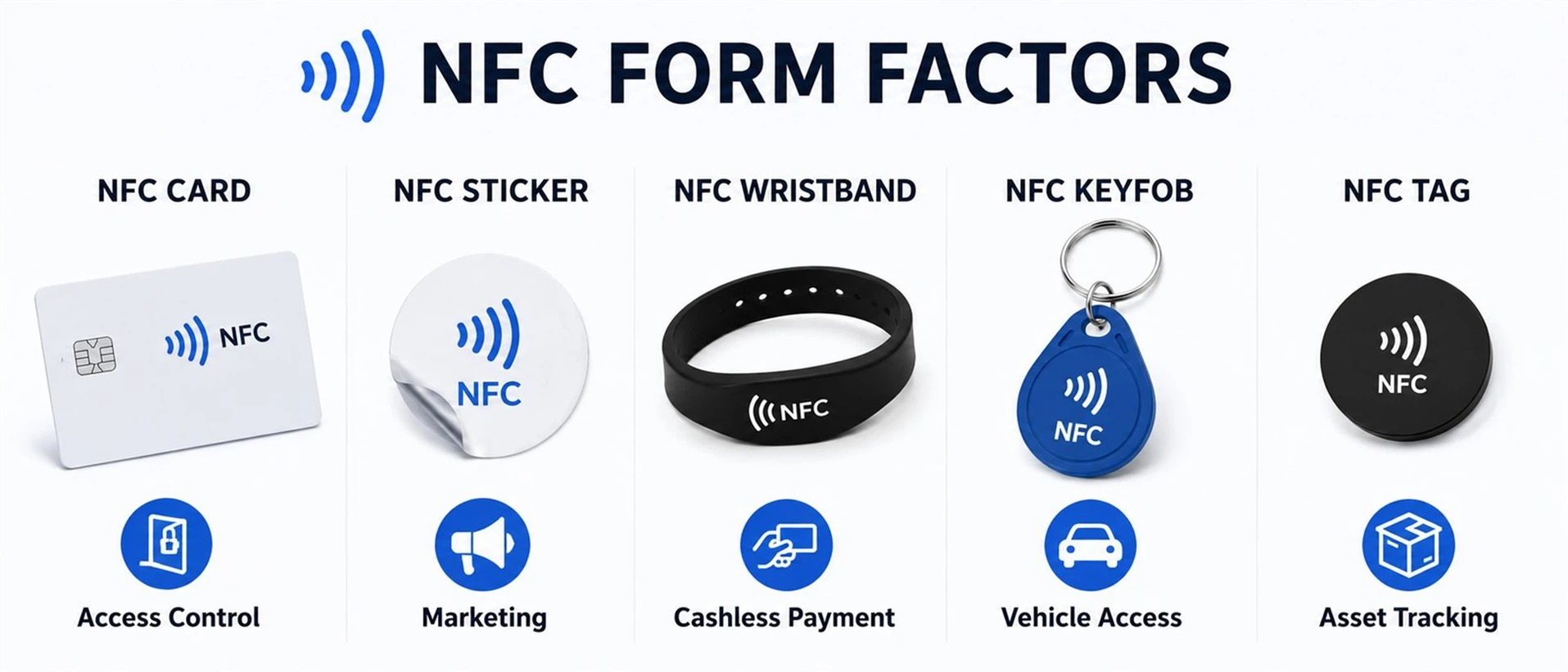
When most people picture an NFC tag, they imagine a small round sticker. And stickers are indeed the most common form factor: thin, adhesive-backed, and applicable to almost any surface.
But NFC tags come in a much wider variety of physical formats, each designed for different environments and use cases:
- NFC stickers and wet inlays - The standard format for marketing, product authentication, and shelf labels. Thin, flexible, and available in custom shapes and printed designs.
- PVC cards - Credit card-sized, durable, and professional. Used for access control badges, membership cards, digital business cards, and hotel keycards.
- Silicone wristbands - Waterproof and comfortable. Popular at events, fitness centers, and amusement parks for cashless payment and entry.
- Keyfobs and tokens - Small, rugged, and attachable to a keychain. Commonly used for building access and vehicle identification.
- Acrylic display plates - Branded stands placed on counters for tap-to-review, tap-to-follow, or tap-to-pay interactions. Increasingly popular in restaurants and retail.
- Coin tags and disc tags - Small, rigid, and embeddable into products or packaging for authentication and anti-counterfeiting.
- Anti-metal (on-metal) tags - Specially engineered with a ferrite shielding layer to work on metallic surfaces where standard NFC tags would fail. Essential for industrial asset tracking, IT equipment management, and tool identification.
When a restaurant chain client needed countertop NFC tags that could survive daily cleaning with food-grade disinfectant spray, we tested three form factors side by side. Standard adhesive stickers began peeling within 3–4 weeks. The acrylic display plates showed no adhesion failure after 6+ months under the same cleaning routine. If your NFC tags will face regular cleaning, liquids, or physical handling, rule out stickers at the form-factor stage, not after deployment.
You can explore our full range of custom NFC tags to see available options for your application.
Real-World Applications of NFC Tags
1.2 billion people used NFC to make a contactless payment in 2023, according to Gitnux industry statistics. But payment is only one of six major ways businesses are deploying NFC tags today.
Contactless payments. This remains the dominant use case. Contactless transactions now account for roughly 79% of daily consumer purchases worldwide, according to Mordor Intelligence citing Mastercard data. Mobile wallets like Apple Pay, Google Pay, and Samsung Pay all rely on NFC.
Access control and hotel keys. NFC-enabled keycards and smartphone-based digital keys are replacing traditional magnetic stripe cards in hotels, offices, and residential buildings. In an early pilot at the Clarion Hotel in Stockholm, 60% of guests using NFC digital keys reported saving more than 10 minutes during their stay, and 80% said they would continue using the technology.
Smart marketing and review collection. NFC-powered Google Review Cards and smart posters allow businesses to collect customer feedback with a single tap, no app download required. Customers tap their phone on a branded NFC stand, and a review page opens instantly. This format is gaining rapid traction in restaurants, salons, and service businesses.Learn more about this trend in our article on why NFC Google Review Cards are so popular.
Product authentication and anti-counterfeiting. Each NFC chip has a unique, factory-burned UID (Unique Identifier) that cannot be altered. Combined with asymmetric encryption algorithms, this makes NFC tags a powerful tool for verifying product authenticity, especially in luxury goods, pharmaceuticals, and wine.Read more about how NFC achieves anti-counterfeiting.
Logistics and asset tracking. When UPS integrated RFID and NFC scanning across more than 1,000 distribution sites in its global network, the company achieved a 67% reduction in package misloading rates, a significant operational improvement that also reduced fuel consumption and carbon emissions.
Digital business cards. Instead of handing out paper cards, professionals program their contact details (vCard format) onto an NFC card or phone sticker. A tap transfers the full contact record to the recipient's phone. No app needed, no typing required.
Common Mistakes Beginners Make with NFC Tags
After years of manufacturing NFC tags and supporting customers across dozens of industries, we see the same beginner mistakes repeatedly. Knowing these pitfalls upfront can save you time, money, and frustration.
Mistake 1: Placing standard NFC tags on metal surfaces
This is the single most common problem. Standard NFC tags stop working when applied directly to metal. The reason is physics: metal surfaces induce eddy currents that absorb and distort the 13.56 MHz electromagnetic field, effectively blocking communication between the tag and the reader.
The solution: Use anti-metal NFC tags. These tags include a ferrite shielding layer between the chip/antenna and the metal surface. The ferrite material redirects magnetic field lines away from the metal, restoring reliable communication. If you need to tag metal shelves, machinery, IT equipment, or vehicles, anti-metal tags are not optional. They are required.

The solution: Use anti-metal NFC tags. These tags include a ferrite shielding layer between the chip/antenna and the metal surface. The ferrite material redirects magnetic field lines away from the metal, restoring reliable communication. If you need to tag metal shelves, machinery, IT equipment, or vehicles, anti-metal tags are not optional. They are required.
A cheaper workaround is to create a 5–10 mm gap between the tag and the metal using a foam spacer, but this approach is less reliable, less durable, and not recommended for commercial deployments.
Mistake 2: Choosing the wrong chip for the data payload
We regularly see customers order NTAG213 tags for projects that require storing full vCard data, only to discover that 144 bytes is not enough for a name, title, company, phone, email, and website. The tag either cannot be programmed or must truncate critical fields.
The fix: Calculate your data requirements before selecting a chip. A short URL needs 50–100 bytes (NTAG213 is fine). A complete vCard needs 300–600 bytes (choose NTAG215 or NTAG216).
Mistake 3: Ignoring phone case interference
Users often report that NFC tags "don't work" when the issue is actually a thick phone case, especially cases with built-in metal rings, magnetic mounts, or MagSafe-style attachments. These metallic elements in the case interfere with the NFC antenna, reducing or eliminating read capability.
In our experience supporting retail clients with tap-to-review setups, roughly 8 out of 10 "tag not reading" complaints were resolved the moment the customer removed their phone case. Ask about the case first, replace the tag second.
Mistake 4: Leaving tags unlocked in public spaces
An NFC tag that remains in "write" mode can be overwritten by anyone with an NFC-enabled phone and a free tag-writing app. Malicious actors have been known to replace legitimate NFC tag data in public locations, redirecting taps to phishing websites or malware download pages instead of the intended destination.
Best practice: Always lock your NFC tags to read-only mode after programming. NTAG21x chips support password-protected locking, and permanently locking the tag prevents any future modification. For public-facing deployments, periodic physical inspection of your tags is also advisable.
NFC Tag Security: What You Should Know
NFC has a strong security foundation, but no technology is immune to misuse. Here is a balanced overview.
Built-in security advantages:
- Short range acts as a physical safeguard. Because NFC requires proximity of under 10 cm, remote eavesdropping or unauthorized scanning is extremely difficult in practice. An attacker would need to be centimeters from your device.
- Unique identifiers. Every NFC chip has a factory-assigned 7-byte UID that is burned at manufacture and cannot be modified on standard tags.
- Encryption support. Advanced NFC tags used in payment cards employ EMV tokenization and cryptographic protocols that generate unique codes for every transaction.
- Very low attack success rates. Testing data compiled by Gitnux shows that NFC relay attacks, where an attacker tries to intercept and retransmit NFC communication, succeeded in only 0.02% of tested transactions in 2023.
Risks to be aware of:
- Tag tampering in public spaces. As mentioned above, unlocked tags can be rewritten. Always use read-only locking.
- Skimming concerns. While theoretically possible, real-world NFC skimming (someone holding a hidden reader near your card) is extremely rare and is mitigated by modern encryption, transaction limits, and the need for close proximity.
- Cloning low-security tags. Basic NFC tags without encryption can have their UID replicated by specialized equipment. For high-security applications like product authentication, use tags with asymmetric encryption, not just UID-based verification.
The bottom line: NFC is inherently secure for the vast majority of use cases. Risks arise primarily from improper deployment (unlocked tags, no encryption) rather than from the technology itself.
Is NFC Worth Adopting for Your Business Right Now?
If you have identified a potential use case for NFC tags while reading this guide, the natural next question is: is this technology mature enough to invest in, or still too early?
The short answer is that NFC is no longer emerging. It is infrastructure. Here is the data behind that claim:
- The global NFC market was valued at approximately $21.7 billion in 2024 and is projected to reach $30.5 billion by 2029, growing at a CAGR of 7.1%, according to MarketsandMarkets. This estimate is based on already-deployed NFC payment infrastructure and represents a conservative industry consensus, a reasonable baseline for business planning.
- Over 90% of smartphones shipped globally now include NFC chips, according to Verified Market Research. The reader hardware is already in your customers' and employees' pockets.
- Contactless transactions account for roughly 79% of daily consumer purchases, according to Mordor Intelligence citing Mastercard data.
- NFC adoption is expanding beyond payments into healthcare, office access control, transit systems, and smart packaging, with each sector building on the same underlying tag-and-reader infrastructure that is already standardized and globally interoperable.
If you identified a use case in the sections above, whether it is customer review collection, access control, product authentication, or asset tagging, the technology, the standards, and the device ecosystem are ready. The next step is matching your use case to a tag specification.
How to Choose the Right NFC Tag for Your Needs
Selecting the right NFC tag does not need to be complicated. Follow this decision path:
Step 1: Define your use case. What action should happen when someone taps the tag? Open a URL? Store a vCard? Trigger a payment? Grant building access? Verify product authenticity?
Step 2: Choose your chip based on data needs.
- URL or simple text → NTAG213 (144 bytes, most cost-effective)
- Digital business card or multi-field data → NTAG215 (504 bytes) or NTAG216 (888 bytes)
- High-security authentication → Chips with built-in cryptographic engines (consult your supplier)
Step 3: Select the physical form factor.
- Flat, non-metal surfaces → Standard NFC stickers
- Professional or customer-facing → PVC cards or acrylic stands
- Metal surfaces → Anti-metal tags with ferrite shielding
- Harsh environments → Epoxy-encapsulated or silicone-sealed tags
- Wearable use → Silicone wristbands or keyfobs
Step 4: Request samples and test before committing. Test your tags with the actual phones, readers, and surfaces you will use in deployment. This single step avoids the most common deployment failures: surface compatibility issues, read-range surprises, and adhesion problems that only show up in real conditions.
FAQ
Q: What does NFC tag mean?
A: An NFC (Near Field Communication) tag is a small, battery-free device containing a chip and antenna. It wirelessly transmits stored data to NFC-enabled devices like smartphones when they are held within a few centimeters. NFC tags operate at 13.56 MHz and are governed by international standards including ISO/IEC 14443. If you have seen an "NFC tag detected" notification on your phone, it means your device recognized a nearby tag and is ready to read its data.
Q: How do NFC tags work without a battery?
A: NFC tags use electromagnetic induction. When a reader device (such as a smartphone) comes close, its electromagnetic field provides enough energy to power the tag's chip, which then transmits its data back to the reader.
Q: What is the difference between NFC tags and QR codes?
A: NFC tags communicate via radio waves with a tap, while QR codes are scanned visually with a camera. NFC tags are rewritable, more secure (supporting encryption and password locks), and offer a faster user experience. QR codes are cheaper to produce but lack security and cannot be updated once printed.
Q: Can NFC tags work on metal surfaces?
A: Standard NFC tags fail on metal due to electromagnetic interference. Anti-metal NFC tags, which include a ferrite shielding layer, are specifically designed to work reliably on metallic surfaces and are widely used in industrial, IT, and logistics applications.
Q: How do I choose the right NFC tag chip?
A: Match the chip to your data needs. NTAG213 (144 bytes) works for short URLs and is the most affordable. NTAG215 (504 bytes) suits digital business cards and medium data loads. NTAG216 (888 bytes) handles the largest data payloads. All three are universally compatible with NFC smartphones.
Ready to Get Started with NFC Tags?
Whether you need 100 NFC stickers for a marketing pilot or 100,000 custom-printed anti-metal tags for an industrial deployment, choosing the right tag starts with understanding your requirements and working with a supplier who manufactures, not just resells.
At Syntek, we produce NFC tags in-house with our own chip-bonding line, mold production facility, and printing equipment, with a daily bonding capacity exceeding 100,000 chips. We support OEM custom orders, provide free samples, and ship globally.
Explore our full NFC tag product line →
Have a specific project in mind? Contact us for technical consultation and free samples.
Published by Syntek Smart Technology Co., Ltd. RFID and NFC product manufacturer since 2006. ISO 9001 certified.
Send Inquiry