


Blank RFID Cards vs. Pre-Printed Cards: Which Option Is Best for Your Project?
May 30, 2026
Leave a message

Most teams arrive at this question expecting to choose between a plain white card and one with a logo on it. That instinct is exactly why a surprising number of credential projects run over budget or stall the week before go-live. The print on a card surface is the cheapest, most reversible decision in the whole project. The variables that actually decide whether blank RFID cards or pre-printed cards are right for you sit underneath it: who owns the printing step, who encodes the chip, how fast you can reissue, and whether the card can be cloned at all.
This guide is written from the supplier side of the table, by people who quote these orders and field the support tickets when a card fails to open a door. The aim is to hand you the procurement logic, not a sales pitch.
The Surface Is the Least Important Part of This Decision
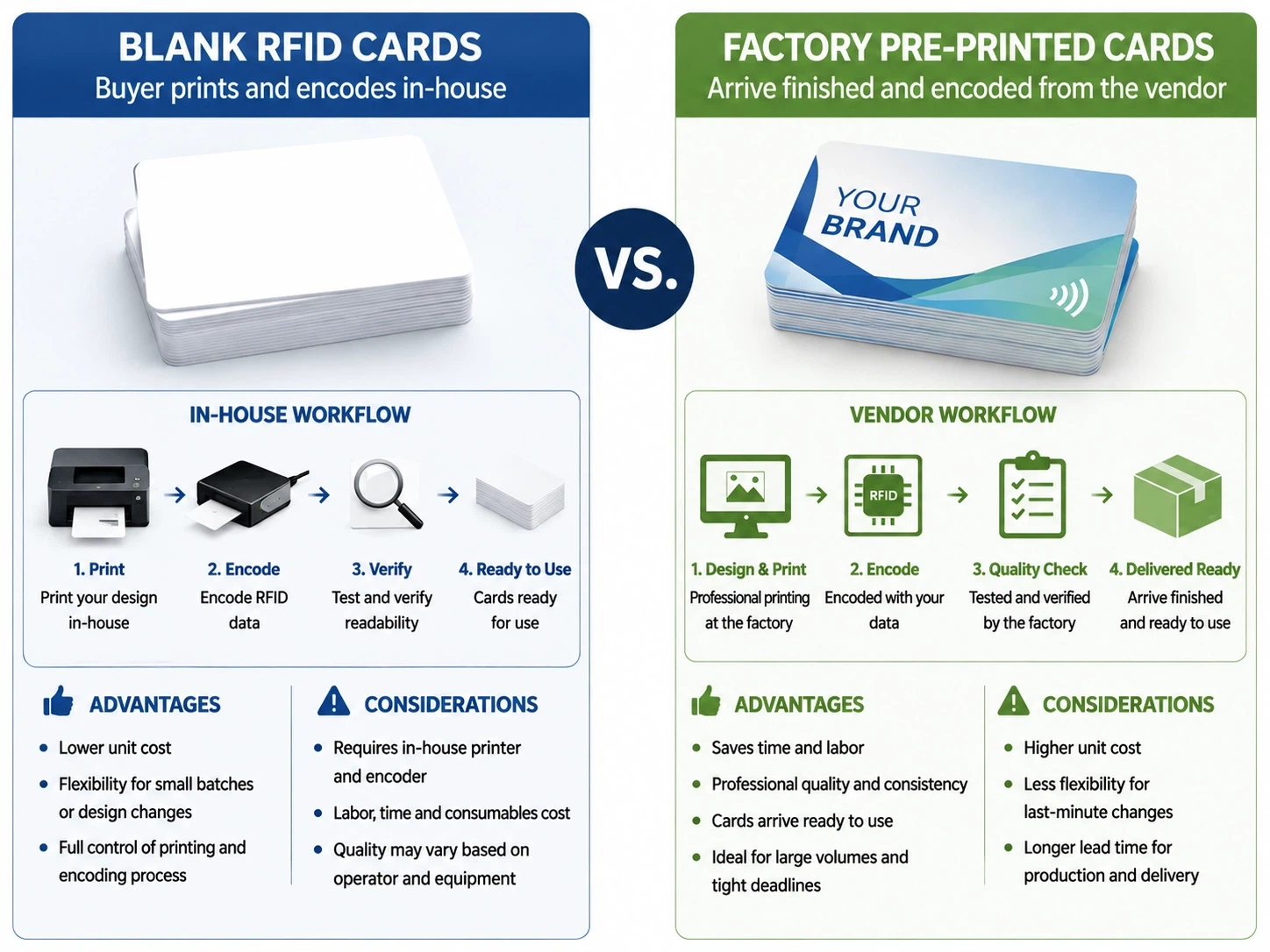
Strip away the branding question and you are really choosing between two operating models. With blank stock, you buy unprinted cards that already contain a live chip, then take ownership of two downstream steps yourself: printing the artwork and encoding the data. With pre-printed cards, the factory does both and ships you a finished credential that is ready to hand out the moment it lands.
For most B2B deployments, buying blank RFID cards and owning that print-and-encode step in-house is the stronger default: same-day reissue, design changes without a reorder, and a unit cost that keeps dropping as volume climbs. Outsourcing the finished card only takes the lead in two situations, low annual volume that never clears the cost of equipment, or customer-facing artwork that has to look identical on every card in circulation. Working out which of those describes you is the whole job of the sections below, so read the rest as a way to locate your own project rather than a neutral catalogue of pros and cons.
What "Blank" Actually Means, and the Term That Trips Buyers Up
"Blank" is one of the most overloaded words in card procurement, and ordering the wrong thing because of it is common enough to deserve its own warning. A plain blank card can be any unprinted plastic with no chip at all, the kind used for basic name badges. A blank RFID card is a different animal: the surface is unprinted, but a working chip and antenna are sealed inside, ready to be encoded. "White card" and "white PVC card" usually point to that same chip-bearing version, though not always.
If you are sourcing for an access or identification system, you want the version with the chip, and you want to spell that out on the purchase order down to the chip family: MIFARE DESFire EV3 for a 13.56 MHz access system, or an EM4200 for a 125 kHz one, not just "13.56 MHz blank card." The reason this goes beyond semantics: printable blank RFID cards are a narrower category still, and assuming any white card will run through your printer is the first place projects quietly go wrong.
Six Dimensions That Actually Decide It
A useful comparison runs well past the usual three rows of flexibility, cost, and looks. Here is how the two options stack up across the factors a buyer is genuinely accountable for:
| Dimension | Blank cards (you print + encode) | Pre-printed cards (factory-finished) |
|---|---|---|
| Customization flexibility | High; design and data applied on demand, changed any time | Fixed at order; changes require a new production run |
| Per-card cost | Low once amortized, but carries equipment and consumables | Higher per unit, with no equipment to own |
| Lead time and MOQ | Stock once, issue instantly; low effective minimum | Days to weeks per order; higher minimum for custom art |
| Branding and finish | Depends on your printer; border width and quality vary | Consistent, edge-to-edge, professional out of the box |
| Security control | You hold the encoding keys and the data | Vendor encodes; you trust their key handling |
| Data ownership | Full local control over what lands on each chip | Shared with the vendor's production process |
Read the security and data rows before the cost row. The headline reason most operations choose blank RFID cards for access control is rarely the unit price; it is keeping encoding and key management inside their own four walls. And treat that security row as non-negotiable rather than as one tradeoff among six: on any door-access project, whoever holds the encoding keys controls the system, so that single row can settle the model before you weigh the other five.
The Cost Math Nobody Puts in Writing
Teams comparing blank versus custom RFID card costs almost always stall on the same question: which number do I even start from? Here is the clean version. Based on Syntek's 2026 B2B order data, cross-referenced against published retail pricing for printers and consumables, unprinted blank RFID card stock you encode yourself tends to land around $0.45 to $0.95 a card once ribbon and printer wear are folded in, against roughly $3.50 to $7.50 for a fully pre-printed, pre-encoded card delivered ready to issue. On per-unit cost alone, that is a five-to-tenfold gap.
That number is also a trap if you stop reading there, and the arithmetic only works once you price the right machine. An entry-level direct-to-card printer with an encoder runs $1,500 to $2,000, while a retransfer unit capable of the full-bleed finish discussed in the next section starts nearer $3,000. Take the entry tier and a $3 to $6 saving per card, and the printer clears its own cost somewhere between 250 and 650 cards; if your design needs edge-to-edge print, slot the retransfer price into the calculation before you trust the result. Spread across a program that runs for years, that is why the threshold sits near a hundred cards a month rather than at some vague notion of "high volume." Below it, outsourcing wins outright; above it, the case for ordering bulk blank RFID cards becomes hard to argue against.
Our full price sheet for blank RFID card stock, broken out by chip family and volume tier, is something we put together on request rather than publish; the right figure depends on your existing reader base, which the next two sections will help you pin down.
"Printable" Is the Word That Burns Projects
For teams working out how to print RFID cards in-house, the assumption that burns the most budget is also the simplest: a blank card is a blank card, so of course it will print. It is wrong often enough to plan around.
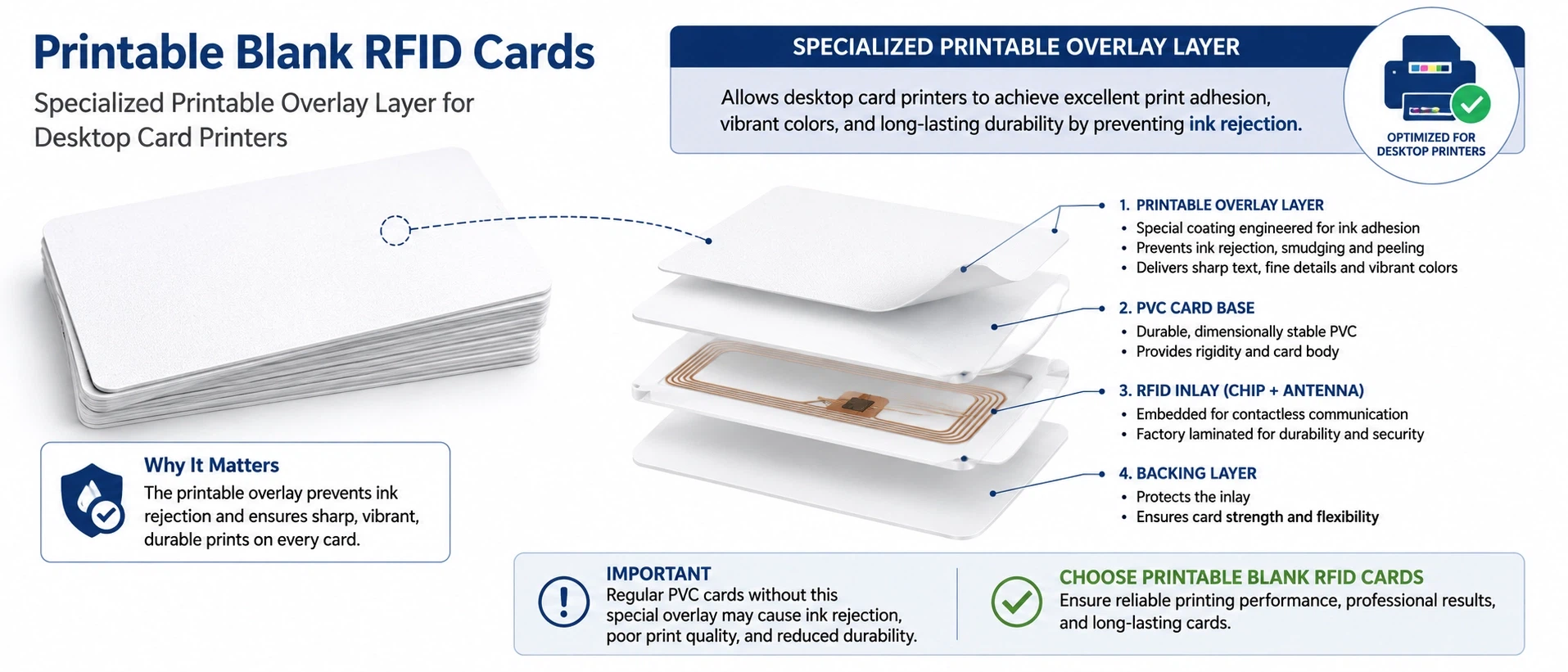
Not all blank stock is built to take print. Some proximity cards are sold explicitly as non-printable, and forcing them through an inkjet or punching a slot where the antenna runs will destroy them. Cards meant for printing carry a proper print surface or overlay, and even then, printed blanks reject at a higher rate than factory-finished cards. In our own production runs that gap typically sits at 2% to 5% on self-printed white stock against under 1% on factory-finished cards, because every speck of dust shows on a freshly printed white field; on a 500-card issuance that is ten to twenty wasted card-and-ribbon sets before you count the reprint labour. There is also a quality ceiling set by your hardware. Direct-to-card printers press the head against the card and stop a few millimetres short of the edge, leaving a thin border, whereas retransfer printing lays the image onto a film first and rolls it over the edge for a true full-bleed result, at a higher cost per machine (Wikipedia). If your design needs edge-to-edge colour, a cheap printer and a stack of printable blank RFID cards will not get you there.
One more variable swings the in-house economics: whether you print and encode in a single pass. Combined encoder modules write the chip while the surface prints, collapsing two steps into one, while a print-then-encode workflow roughly doubles handling time per card. Build that into any labour estimate before you conclude that self-printing blank RFID cards is the cheaper road.
Frequency and Format: The Compatibility Trap
The fastest way to take delivery of a pallet of cards that do nothing is to get the radio side wrong. Frequency comes first. Low-frequency 125 kHz, high-frequency 13.56 MHz, and UHF each speak to different readers, and a card in the wrong band is simply invisible to your hardware. The selection logic here mirrors the one we lay out for EM-based access control cards, where matching the chip to the installed reader base matters more than any line on a spec sheet.
Format is the subtler trap. Access cards carry an encoding scheme, commonly a Wiegand format such as 26-bit H10301, paired with a facility code, and stock often ships on a default facility code unless you say otherwise. Order blank RFID cards in a format your panels do not expect, and they read as unknown credentials at every door. Confirm frequency, chip family, format, and facility code against your existing readers before the order goes in, never after.
Security Lives in the Chip, Not the Print
This is where the blank-versus-pre-printed debate quietly stops mattering. Whether a card wears a logo has no bearing on whether someone can copy it in a hallway. The chip decides that, and on this point the industry deserves a blunter answer than "it depends."
Treat 125 kHz proximity cards and MIFARE Classic as already compromised for anything protecting real assets. The 125 kHz formats broadcast a static, unencrypted ID that copies in seconds, and MIFARE Classic's proprietary cipher has been broken for years; researchers have repeatedly reproduced full cloning against it in live systems (IEEE Xplore). It worsened in 2024, when a hardware backdoor was disclosed in a widely deployed Fudan variant of MIFARE Classic that enables card-only cloning in minutes, reaching hotels and transit networks across several continents (RFID Journal). These chips persist for economic reasons, not technical ones: re-carding and re-readering a large estate is costly, so organizations live with a known exposure for years.

If a credential opens a door, the single decision that genuinely moves your security posture is stepping up to a chip with real cryptography, such as MIFARE DESFire EV2 or EV3, which use AES and mutual authentication and have no published practical clone. Choosing blank RFID cards for a secure site is defensible precisely because you keep the keys, but only when the chip underneath is one worth protecting. For how chip choice and surface customization interact on secure white stock, our guide to security and customization in blank smart cards goes a level deeper.
So Which One Actually Fits Your Project?
The clean recommendations fall out by scenario, not by preference.
If you run a large or rotating population, picture employee badges, a campus, a multi-site workforce, then encodable blank RFID cards are almost always right. New people are credentialed the same day, designs change without a reorder, and the volume sits comfortably past the cost break-even. A customer-facing program is the mirror image. For membership, loyalty, or gift cards, where the card is part of the brand experience and the artwork is fixed, pre-printed cards deliver a consistency an in-house printer struggles to match, and the higher unit cost buys a finish you would otherwise spend months chasing. Hotel keycards sit between the two, and reorder cadence decides it more than looks: a 200-room property reissuing at every check-in is better off keeping a few hundred encodable MIFARE blanks on hand and programming each at the front desk than waiting two weeks on a custom reorder. High-security access overrides all of the above: choose the chip first by the security tier, then treat printing as a secondary, almost cosmetic question. Configuring that single-pass print-and-encode setup for at-desk issuance is the kind of thing our team works through on the quoting call, not something you have to solve alone.
The familiar line that these are simply "different tools for different jobs" is true and useless at the point of purchase. The working default for most B2B access and identification programs is encodable blank stock, with pre-printed reserved for fixed-artwork, customer-facing runs. Start from that default and let a real branding or security requirement argue you off it.
Before You Order: A Sourcing Checklist
Whichever model you land on, the supplier conversation should cover the same ground, and these questions separate a vendor who has actually run these projects from one who is reselling boxes:
- Chip family and frequency confirmed against your installed readers, in writing
- Encoding format and facility code specified, not left on a default
- For self-printing, written confirmation the stock is printable, with the surface or overlay named
- Sample cards run through your own printer and reader before any volume commitment
- Lead time and minimum order quantity stated for both first and repeat orders
- A named technical contact at the quoting stage, who will need to confirm chip selection, facility code, and print compatibility before a production run makes sense
That last line is where a manufacturer earns the order. We have built RFID cards since 2006 under ISO-controlled production for integrators, hotels, campuses, and access-control installers, and the part that actually de-risks a large run is sampling: we ship sample runs inside three to five business days, and a first production order of 5,000 cards typically completes in five to seven business days from art approval, seven to ten days at 10,000. If you are leaning toward self-encoding, a run of unprinted stock ready for in-house encoding lets you control the data from end to end; if you would rather standardize on one white-card SKU across departments, our blank chip card stock supplied in bulk is made to print and encode cleanly. Either way, ask for a sample before the purchase order goes out.
FAQ
Q: Are blank RFID cards cheaper than pre-printed cards?
A: Per card, yes, usually by five to ten times once you are printing at volume, but only after the printer and consumables have paid for themselves.
Q: Can you print on any blank RFID card?
A: No. Only stock built with a print surface or overlay takes ink cleanly, and some proximity cards are sold as explicitly non-printable.
Q: Do blank RFID cards need special printing equipment?
A: Often, yes. Printing them yourself calls for a card printer, and a retransfer model if you need an edge-to-edge design; the stock itself must also be a printable grade, not just any white card.
Q: Will blank RFID cards work with my existing readers?
A: Only when the frequency, chip family, and encoding format, including the facility code, all match your installed readers.
Q: Are blank cards less secure than pre-printed ones?
A: No; surface printing has nothing to do with security. The chip sets clonability, and 125 kHz and MIFARE Classic are both easy to copy.
Q: When does pre-printed make more sense?
A: When cards are customer-facing with fixed branding, you have no in-house printer, or you want a ready-to-issue credential with no encoding step on your side.
Send Inquiry