


How To Roll Out NFC Digital Business Cards For Teams: URL Ownership, Updates And Card Reassignment
Sep 18, 2026
Leave a message

An NFC business card for one person is easy: encode a link, tap it with a phone, and open a profile. A company rollout is different. Once dozens or hundreds of cards are assigned to employees, the important questions become who owns the destination URL, how profiles are updated, what happens when someone leaves, and whether the physical card can be safely reassigned.
The physical NFC card should be treated as a durable pointer into a managed digital identity system. The employee profile, company branding, permissions and lifecycle rules should live behind that pointer rather than being permanently trapped inside the card.
This guide is for procurement, marketing, HR, IT and operations teams planning a managed NFC digital business card program rather than buying individual novelty cards.
Start With What Must Change After the Card Is Issued
A team card will usually outlive at least some of the information printed or displayed on it. Job titles change. Phone numbers change. People move between departments. Branding changes. Employees leave. A company may also change CRM, HR or digital-business-card platforms.
Before choosing the card construction or chip, list the fields that may need to change after deployment:
- employee name and title;
- phone number and email address;
- department, office or territory;
- profile photo;
- company logo and brand assets;
- calendar, social or portfolio links;
- lead-capture form or CRM route;
- legal notice, privacy link or campaign message;
- employee status: active, transferred, suspended or departed.
If any of those fields are expected to change, storing the whole profile directly on the NFC card creates unnecessary maintenance. A hosted profile or redirect-controlled URL usually gives the company more operational control.
Separate the NFC Payload From the Employee Profile
The NFC Forum defines NDEF as a common application-data format for NFC Forum-compliant devices and tags, and its URI record type provides a standard way to store a web address. For a team business-card deployment, that means the NFC card can hold a short URL while the changing employee information remains online.
This creates two layers:
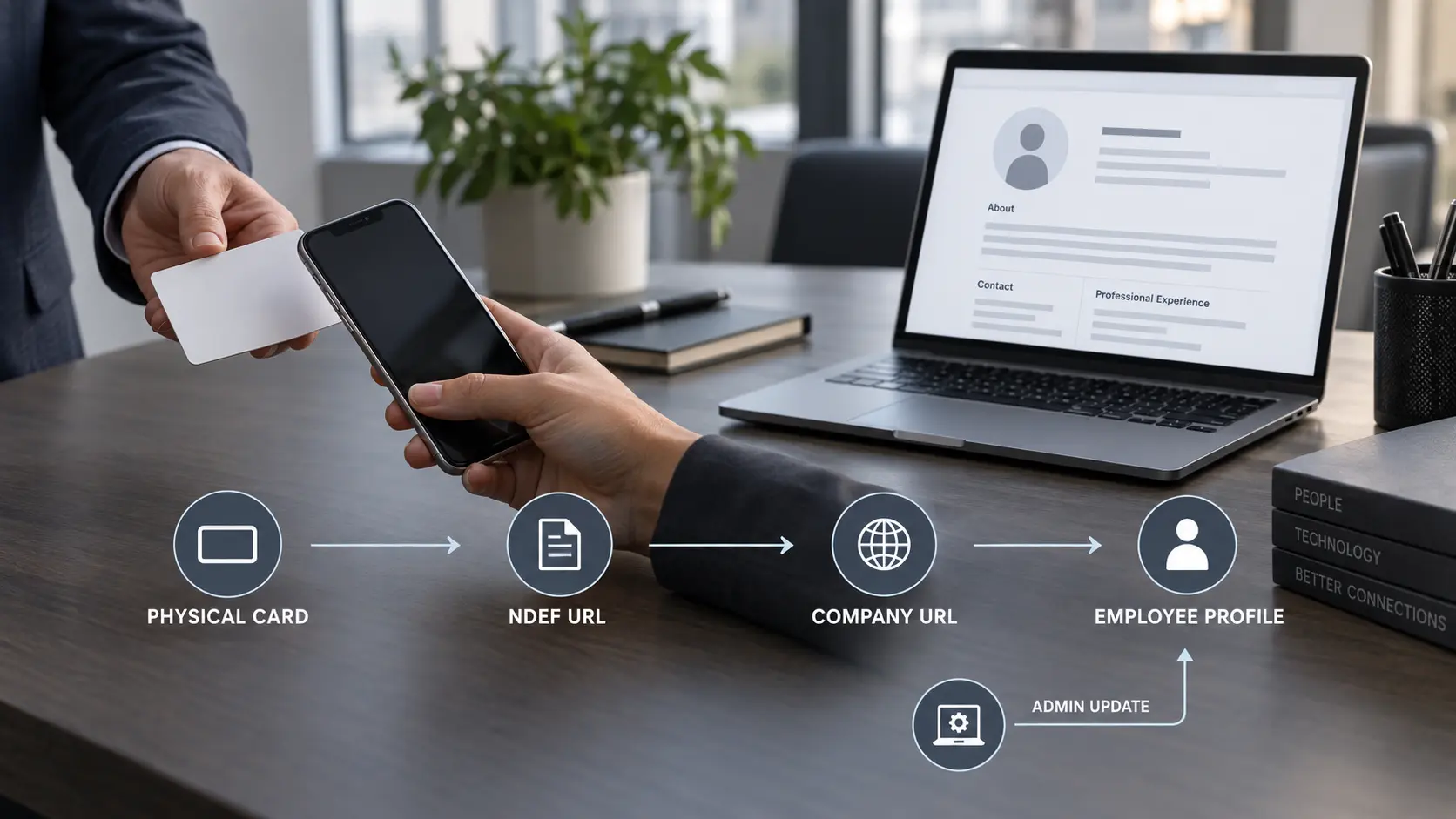
Physical layer: NFC card → NDEF URL
Digital layer: URL → company-controlled profile or redirect → current employee information
That separation is the foundation for profile updates and card reassignment.
If you need a refresher on NDEF and phone-readable NFC tags, see Syntek's NFC tag guide. The NFC Forum's official specifications page describes NDEF and the URI Record Type at the standards level.
Static vCard, Direct Profile URL or Stable Card Token?
| Model | What the NFC card stores | Main advantage | Main limitation for teams |
|---|---|---|---|
| Static vCard | Contact fields directly in NDEF | Can transfer contact data without depending on a hosted profile | Job-title, phone or email changes may require rewriting or replacing the card |
| Direct employee profile URL | URL such as a hosted employee profile | Profile details can change without rewriting the card | Reassignment is awkward if the URL permanently identifies one person |
| Stable card-token URL | Company-controlled URL or token that resolves to an assigned profile | Physical card and employee profile can be managed as separate records | Requires a controlled mapping or redirect layer |
For an individual freelancer, a static vCard or personal profile link can be perfectly reasonable. For a company-managed fleet, the stable-token model is often easier to govern because the organization can change the mapping behind the URL without touching the card.
For example, the card might carry a generic token such as company.example/card/7F4Q. The backend decides which employee profile that token currently resolves to. The token should not expose unnecessary personal data in the URL itself.
Decide Who Owns the URL Before You Print Anything
URL ownership is a procurement requirement, not just a marketing detail.
A team should decide:
- whether the destination uses a company-owned domain, a vendor-controlled domain, or both;
- who controls DNS, redirects and the account that manages the profiles;
- whether a profile URL can be exported or redirected if the software vendor changes;
- whether the URL identifies the employee, the role, the physical card, or an opaque token;
- what happens to an old URL after an employee leaves;
- whether printed QR codes and NFC taps resolve through the same destination logic.
A company-controlled redirect layer can reduce platform lock-in. The physical NFC card can point to a stable company URL, while the company redirects that URL to whichever profile system is currently approved.
If a third-party platform owns the final URL, verify its offboarding, export, redirect and reassignment behavior before encoding thousands of cards.
Keep Four Records Distinct
A controlled rollout should not use one spreadsheet column called "card ID" for everything.
| Record | Example role | System owner |
|---|---|---|
| Physical card reference | Printed serial, asset number or packing sequence | Procurement / operations |
| NFC payload | NDEF URL or stable card token | NFC encoding / web architecture |
| Employee profile | Name, title, contact details, profile status | HR / marketing / identity platform |
| Assignment record | Which physical card is currently assigned to which employee | Admin or asset register |
The printed QR code can be a fifth field if it uses a different value, but that usually increases operational risk. When NFC and QR are intended to reach the same digital profile, using the same controlled URL or token for both makes testing and support simpler.
Choose the Assignment Model Before Onboarding
There are three common assignment patterns.
Person-specific cards
The card is intended to stay with one named employee. This fits premium printed cards with the person's name and title on the surface. The online profile can still change, but physical reassignment may not make sense because the print remains personal.
Role-specific cards
The card represents a position, location or team rather than a permanent individual. A sales desk, regional manager role or event team can change personnel while keeping the same external destination. This makes reassignment easier but requires clear internal ownership.
Reusable pooled cards
The card is a company asset with generic branding. A backend assignment record links each card token to the current employee. When the employee leaves, the mapping can be cleared and the card can be reassigned after inspection and validation.
The physical design and the URL model should match. A highly personalized printed card and a reusable pooled-card workflow pull in opposite directions.
Do Not Confuse a Locked NFC Card With a Fixed Digital Profile
Many NFC tag ICs can be made read-only after encoding. NXP documents field-programmable read-only locking for the NTAG213/215/216 family, and its data sheet explains that some lock settings are irreversible.
That can be useful when you do not want a public card's NDEF URL rewritten. But locking the NFC memory does not mean the digital profile behind the URL must stay frozen.
The useful design pattern is:
lock the approved NFC URL if the project requires it → keep the destination or mapping under company control → update the profile on the server side.
Before irreversible locking, approve the final URL architecture. A permanently locked person-specific URL can make later physical-card reassignment impossible without relying on redirects or replacing the card.
For the chip-level locking behavior, use the NXP NTAG213/215/216 product documentation and the corresponding data sheet rather than assuming every NFC chip behaves the same way.
Build Onboarding Around Assignment, Not Re-Encoding
A scalable onboarding workflow should avoid unnecessary NFC writing at the employee's desk.
- Create or import the employee profile.
- Apply the approved company template and field permissions.
- Assign an unused card token or physical card to the employee.
- Confirm that NFC and QR resolve to the intended profile.
- Check the employee-facing details on at least one normal phone.
- Record the assignment in the company asset or admin register.
- Release the card to the employee.
If every onboarding event requires rewriting the NFC memory, the deployment becomes dependent on local writer hardware, staff procedure and tag write permissions. A stable token with backend reassignment reduces that dependency.
Profile Updates Should Not Require a New Card
A title or phone-number change should normally be handled at the profile layer.
The admin updates the digital record, while the physical NFC card continues pointing to the same controlled destination. This is one reason current team-focused digital business card platforms emphasize centralized profile updates and company templates rather than replacing physical cards whenever employee information changes.
For procurement, the important question is not which SaaS platform has the longest feature list. It is whether your chosen architecture lets the company update employee information without changing the encoded NFC payload.
Define the Offboarding Rule Before the First Card Is Issued
When an employee leaves, the organization should already know what happens to four things: the public profile, the URL, the physical card and any leads or records connected to that profile.
A controlled offboarding sequence can be:
- Disable or archive the employee profile.
- Decide what the existing URL should do.
- Remove the employee's access to edit the profile.
- Mark the physical card as returned, lost or retired.
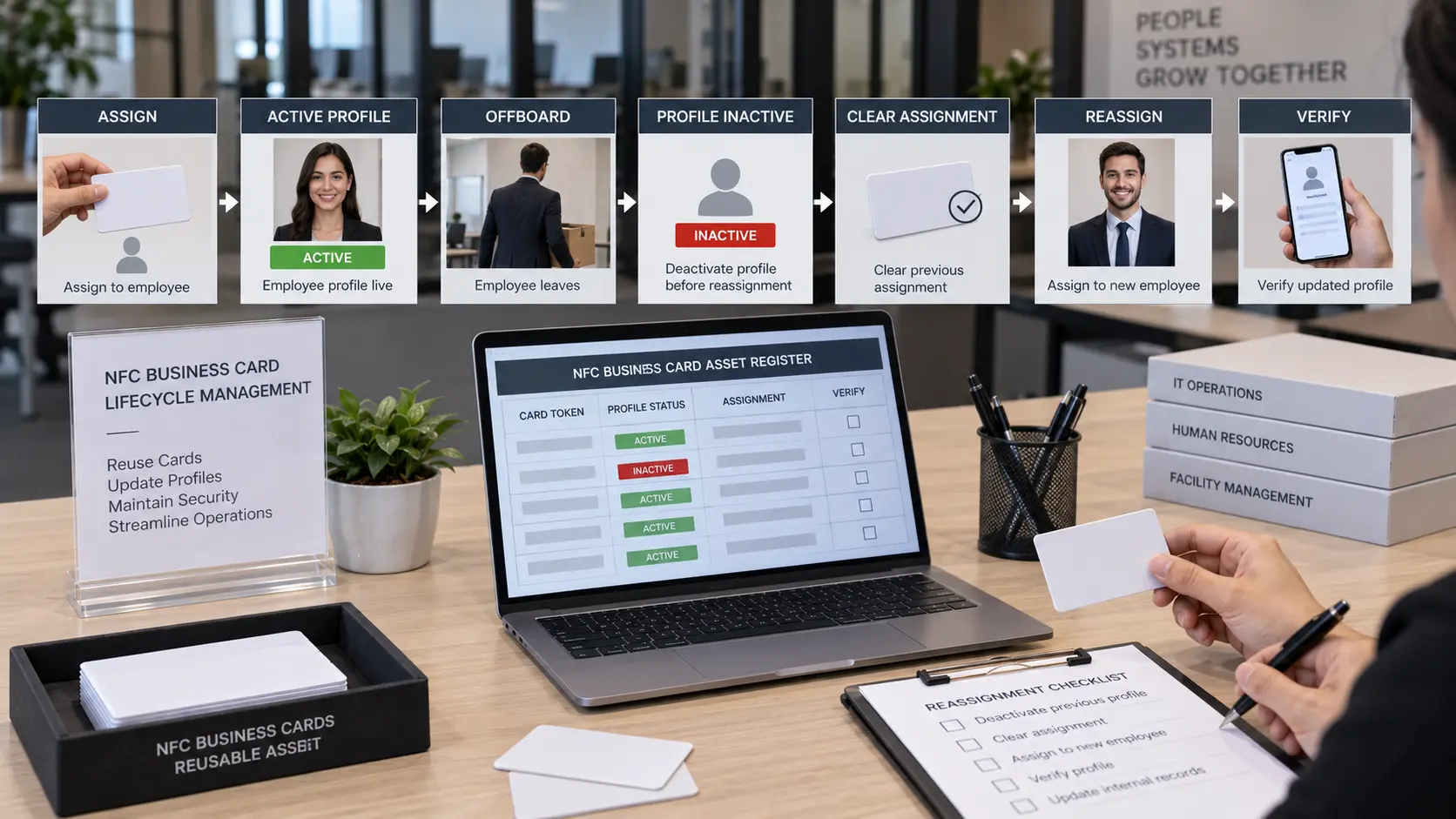
- If the card will be reused, clear the old assignment.
- Verify that tapping the old card no longer presents the departed employee as active.
The URL can then be handled in one of several ways depending on policy:
- show a retired-profile message;
- redirect to a team or company contact page;
- keep a role-based profile active;
- remap a reusable card token to a replacement employee.
Do not automatically transfer a person's public identity to someone else just because the physical card is reusable. The URL meaning, printed name and external expectations all need to match the reassignment policy.
Card Reassignment Depends on Both Print and URL Design
A generic branded card with a stable card-token URL is the easiest form to reassign.
A card printed with "Jane Smith, Sales Director" is not operationally reusable in the same way, even if the NFC token can be reassigned in software. Reuse decisions therefore have two gates:
- digital gate: can the URL or token be safely remapped?
- physical gate: does the printed card still accurately represent the new user?
If both pass, reassignment can follow this sequence:
- deactivate the previous assignment;
- inspect the returned card;
- read the NFC payload and compare it with the register;
- verify the printed QR code if present;
- assign the token to the new profile;
- test the card on a normal phone;
- confirm the previous employee profile is no longer reachable through that card;
- record the new assignment.
Keep NFC and QR as One User Journey
A QR code is a useful fallback for users whose phones have NFC disabled, whose cases make tapping awkward, or who simply prefer scanning.
The mistake is maintaining two unrelated destinations. If the NFC tag opens one profile and the QR code opens another, every profile update becomes a synchronization problem.
For most team deployments, NFC and QR should resolve through the same profile or redirect architecture. Test both paths on the finished printed card.
Set Editing Permissions Before Employees Receive Access
Team governance should distinguish company-owned fields from employee-editable fields.
Company-controlled fields may include:
- logo and brand colors;
- legal company name;
- corporate website and privacy links;
- approved booking or campaign links;
- layout and template;
- mandatory disclaimers.
Employee-editable fields may include:
- preferred display name;
- job title within policy;
- direct phone number;
- approved professional social links;
- profile photo.
The exact division depends on company policy, but it should be decided before rollout. Otherwise the physical card may remain on-brand while the destination profile becomes inconsistent.
Test a Finished Team Workflow Before Bulk Production
A successful NFC tap is only one line in the acceptance test.
| Test layer | Question |
|---|---|
| NFC detection | Does the finished card trigger the approved NDEF action on the target phone set? |
| URL | Does the encoded URL exactly match the approved company-controlled destination? |
| QR fallback | Does the printed QR code resolve to the same intended profile path? |
| Assignment | Does the selected card token open the correct employee profile? |
| Profile update | Can a title or phone change appear without rewriting the NFC card? |
| Offboarding | Does disabling the employee remove or redirect the public profile as intended? |
| Reassignment | Can an approved reusable card be mapped to a new profile without exposing the former employee? |
| Locked state | If the NFC memory is locked, is that state intentional and recorded after the correct URL was verified? |
| Printed data | Do name, role, QR code and other visible fields match the intended reuse model? |
Syntek's NFC card testing checklist covers the broader finished-card acceptance process, including NDEF, destination, print and mapping checks before mass production.

What to Put in an NFC Team Business Card RFQ
| RFQ field | What to define |
|---|---|
| Program model | Person-specific, role-specific or reusable pooled cards |
| Phone interaction | Tap-to-open URL, direct vCard or another approved NDEF action |
| URL ownership | Company domain, redirect layer, platform domain and migration responsibility |
| Encoding | Common URL, unique card-token URL or person-specific URL |
| Variable data | Printed name, serial, QR code, department or other per-card fields |
| NFC/QR mapping | Whether both paths use the same destination and how the mapping file is structured |
| Writable state | Writable, password-controlled or permanently locked after approval |
| Reassignment policy | Whether the card may be reused and what must be cleared, remapped or reprinted |
| Sample test | Phone set, NFC path, QR path, profile update, offboarding and reassignment checks |
| Change control | Which chip, URL, print, QR or encoding changes require a new sample approval |
If you are sourcing the physical card itself, Syntek's NFC business card product page is the appropriate commercial next step. If the project specifically involves NTAG215 and bulk customization, the NTAG215 bulk sourcing guide covers procurement risks that are outside this rollout article's scope.
The Rollout Rule
For a team program, the most durable architecture is usually the one that keeps the physical card stable while keeping the employee identity manageable.
A practical decision sequence is:
team ownership → company-controlled URL strategy → NDEF payload → employee-profile model → card assignment → editing permissions → NFC/QR acceptance → offboarding rule → reassignment rule → bulk approval
The central idea is simple: the NFC card should point to a managed identity, not become the identity itself. Once that distinction is designed correctly, profile updates, employee changes and card reuse become controlled administrative tasks instead of reasons to reprint or re-encode the entire fleet.
Send Inquiry