

DS1990A-F5 vs. RW1990 Touch Memory Keys for Fleet Driver ID and Intercom Access
Nov 24, 2026
Leave a message

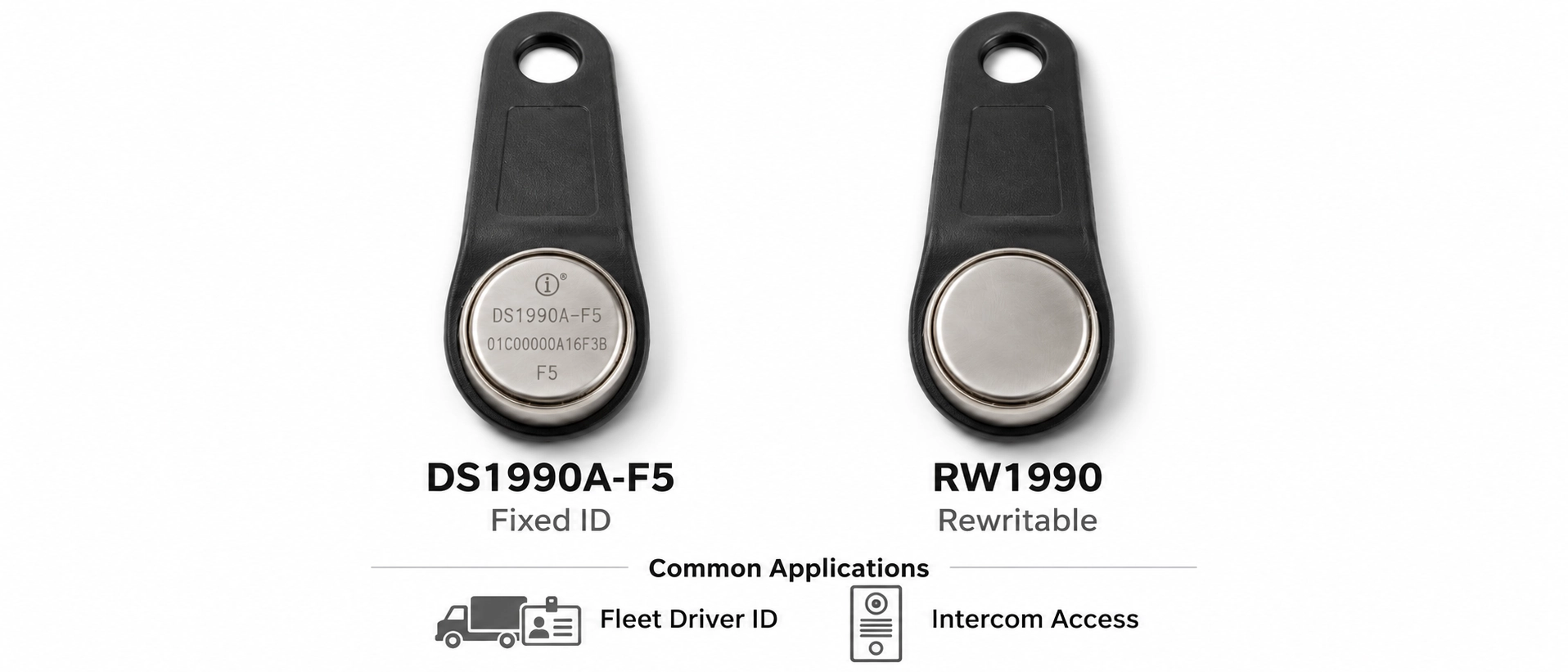
Two Touch Memory keys can share the exact same stainless-steel F5 can and plastic fob holder while behaving completely differently once they reach your hardware. The "F5" designation refers only to the standard stainless-steel iButton package form factor, not the silicon inside or whether the identifier can be changed. One key carries a factory-set 64-bit read-only memory (ROM) ID. The other is a rewritable blank designed to accept a programmed ID through a compatible contact writer.
For fleet telematics integrators and intercom maintenance contractors, ordering by housing appearance or a generic "Dallas key" label can lead to bench rejections and field rework. Before requesting a quote or signing off on a bulk shipment, confirm which ID behavior your system requires, how your reader and controller process the string, and what evidence a sample batch must produce before production begins.
Choose the ID Type Before You Request a Quote
Start by matching the credential type to your enrollment workflow rather than assuming you need rewritable TM cards. If your fleet platform or intercom controller lets administrators enroll new keys directly into an allowlist, a fixed-ID key avoids the extra step of managing writers and blank revisions. If your property management workflow or replacement policy relies on authorized field programming onto blank media, you will need a verified rewritable revision.
| Key Option | ID Behavior | Typical Sourcing Use Case | What to Specify on Your RFQ |
|---|---|---|---|
| Genuine DS1990A-F5+ (Analog Devices) | Factory-set, read-only 64-bit ROM ID (with an engraved registration number on the stainless-steel can) | Projects requiring original-manufacturer silicon and direct controller enrollment | Exact manufacturer part number (DS1990A-F5+), confirmed supply origin, and lot traceability documentation |
| Compatible Fixed-ID Keys (e.g., supplier-designated TM1990A-F5) | Fixed, read-only 64-bit ID from compatible non-original silicon suppliers (not an Analog Devices part number) | Cost-sensitive deployments where administrators enroll unique IDs at the controller or backend | Silicon source or supplier code, exact supplier part number, and sample approval on target hardware |
| Rewritable TM Cards / RW1990 | Programmable 64-bit ID using a compatible contact writer | Authorized replacement workflows where an approved programmer writes assigned IDs onto blanks | Exact chip revision (e.g., RW1990 vs. RW1990.2), approved writer model, and sample read-back check |
Note: Before finalizing a spec sheet, confirm in writing whether your supplier is quoting genuine Analog Devices silicon or compatible alternatives, and request origin and traceability documentation whenever original-manufacturer parts are required. You can review fixed-ID and mixed options on the Syntek fixed-ID and rewritable Dallas keys page, or check the dedicated RW1990 Touch Memory key specifications page for programmable blanks.
It also helps to separate three concepts that frequently get conflated in RFQs:
Fixed ROM vs. rewritable memory
Whether the 64-bit identifier is permanently set at the factory or writable with a compatible device.
Data integrity (CRC) vs. anti-cloning security
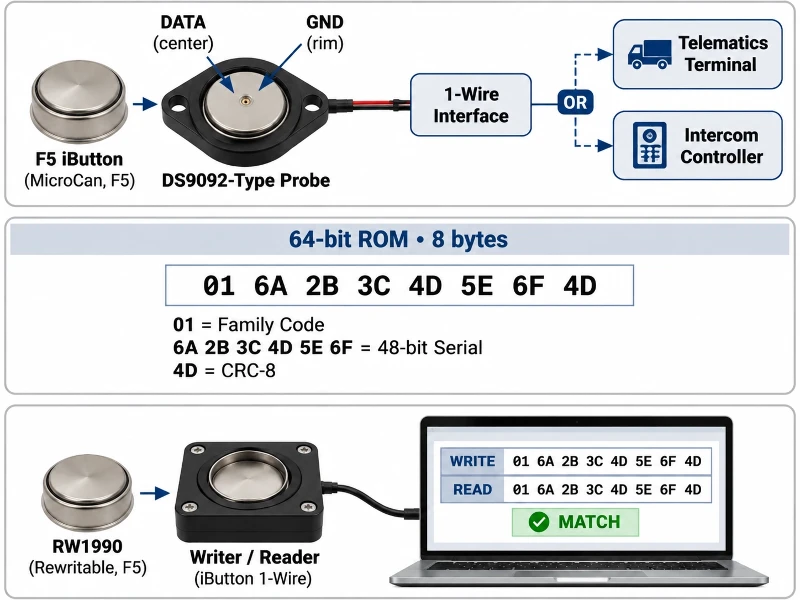
According to the Analog Devices DS1990A datasheet (Rev. 4, 2021), the 64-bit ROM consists of an 8-bit family code, a 48-bit serial number, and an 8-bit cyclic redundancy check (CRC) (Analog Devices). That CRC helps detect transmission errors on the 1-Wire bus; it is a data-integrity check, not a guarantee against every read issue. Likewise, while a read-only DS1990A-F5 ID cannot be rewritten on the original chip, the same 64-bit identifier may still be presented by a compatible writable blank, so fixed-ID storage should not be treated as cryptographic anti-cloning protection.
System access security
Controlling who receives a key, how lost keys are revoked from the allowlist, and how events are logged. Neither a fixed-ID key nor a rewritable blank replaces proper credential lifecycle management.
When comparing procurement cost between fixed-ID and rewritable options, evaluate them on the same quote basis. Beyond unit pricing, include sample qualification, enrollment labor, probe replacement, potential rework from mismatched blank revisions, and replenishment lead times as inputs against your own supplier quotes, since reviewed sources do not provide apples-to-apples field failure rates or universal pricing across both types.
Check the Probe, Controller, and ID Format
A reader beep or indicator confirms only the status reported by that reader. It does not establish that the connected telematics terminal, intercom controller, or software backend has authorized the credential for daily operation.
On the physical layer, a contact probe such as the DS9092 provides the mechanical interface between the F5 stainless-steel can and the 1-Wire bus (Analog Devices). If your project also involves sourcing or replacing dashboard or wall-mounted readers, check the mechanical housing and wiring against a dedicated contact reader such as the Syntek iButton contact probe with LED. In installations with extended wiring runs, cable topology, capacitive load, and signal reflections can also affect 1-Wire communication reliability (Analog Devices), so bench reads on a short harness should not replace testing on a representative cable length.
On the controller and software layer, reading an ID and authorizing it are distinct steps. For example, Teltonika's FMC650 telematics documentation separates basic iButton read notifications from authorized iButton list checking in its device configuration (Teltonika Telematics; Teltonika Telematics). Even when the hardware reads the 64-bit ROM cleanly, verify how your target terminal outputs the raw identifier and how your server or allowlist stores it, including byte order, leading zeros, and whether the full ROM field (family code, serial number, and CRC) is required under your device's configuration documentation.
If you are ordering rewritable RW1990 keys, add a writer compatibility check to your qualification plan. Commercial supplier documentation notes that different RW1990 revisions (such as RW1990 and RW1990.2) can behave differently depending on the writer hardware and firmware (Touch Memory China, commercial supplier guide). Because RW1990 blanks do not follow a single original-manufacturer specification across all suppliers, confirm on your own authorized programming station that it writes and verifies the exact revision you plan to buy in volume.
| Verification Layer | What You Are Checking | Common Failure Point |
|---|---|---|
| 1. Physical Contact | F5 can seats cleanly in the probe at the actual mounting angle without repeated taps | Worn probes, recessed housings, or fob holders obstructing full contact |
| 2. Device Read & Format | Terminal or panel outputs the string expected by your target system (byte order, leading zeros, family code, CRC) | Raw hex output from the reader does not match the format configured in the allowlist or database |
| 3. System & Writer Acceptance | Controller authorizes the key; for RW1990 orders, the approved writer completes write and read-back | Unsupported blank revision, outdated writer firmware, or mismatched allowlist rules |
Treat this three-layer check as a repeatable gate. Re-run sample verification whenever you switch key suppliers, receive a new chip revision, or deploy a controller firmware update.
Define What Counts as a Pass in Your System
Fleet driver identification and building intercom access share the same 1-Wire contact verification logic, but they have different pass criteria at the application layer. Define that pass condition in writing before samples ship.
Fleet Driver ID and Event Logging
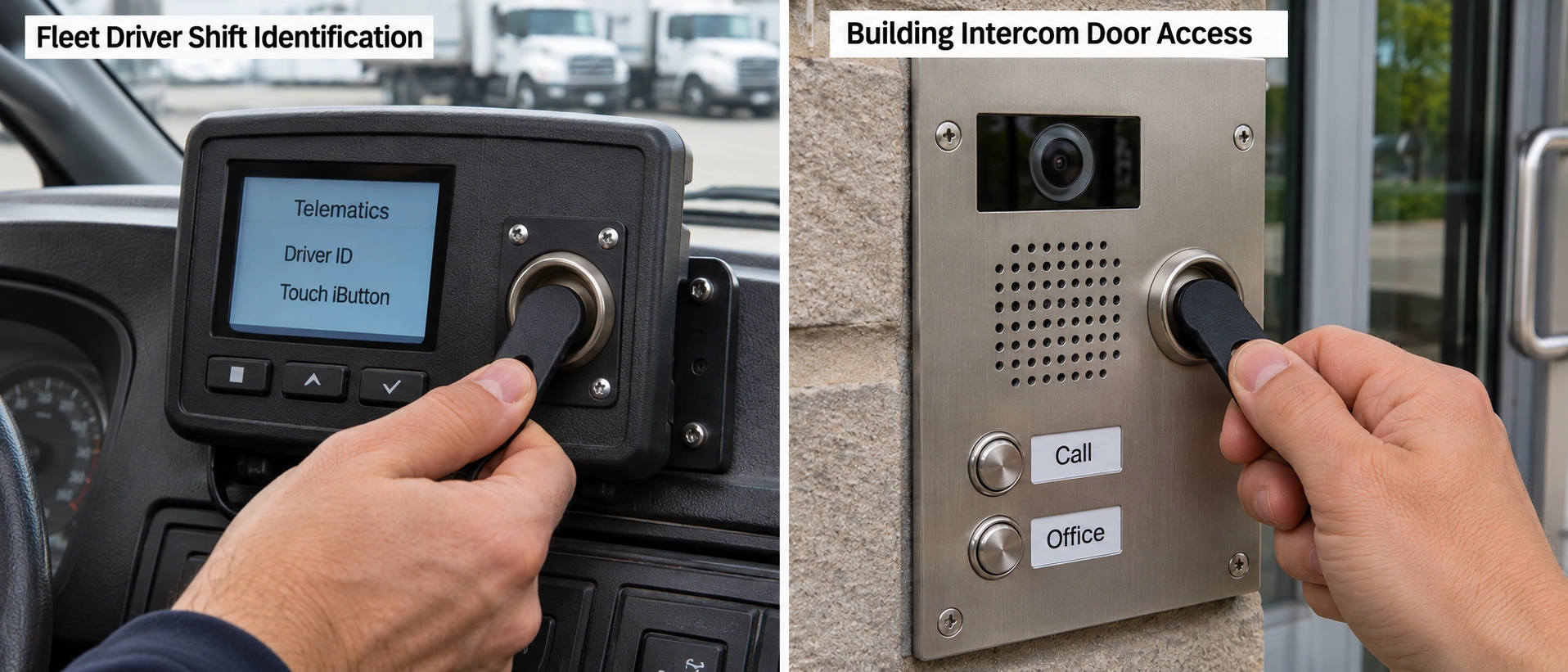
In shared-vehicle fleets, the goal is tying a physical touch at the dashboard probe to an accurate driver record in the telematics platform. In a published deployment case study from Wialon and implementation partner A+A Security for LafargeHolcim in Azerbaijan (originally published in 2020 and updated in 2023), drivers used iButton keys with Ruptela FM Eco4 terminals to identify themselves at the start and end of shifts across a workforce of 169 drivers (Wialon, platform and partner case study). While that case illustrates a standard shift-logging workflow, it does not publish key part numbers, fixed vs. rewritable chip types, or compatibility rates, so treat it as a workflow reference rather than hardware proof for a specific blank.
For your sample approval, define a pass around end-to-end data attribution:
Tap an approved test key against the vehicle's installed probe.
Confirm the telematics unit logs the expected ID string under the active firmware configuration.
Verify that the fleet management platform assigns the start and end shift events to the correct test driver profile.
If your scope includes authorized driving or immobilizer control, have your system integrator verify that behavior separately using the hardware vendor's configuration manual.
Intercom Enrollment and Access
For apartment and commercial building intercoms, acceptance depends on the specific entrance panel, controller board, and property management policy. Equipment manufacturers publish explicit compatibility lists for their panels. For instance, VIZIT's product documentation (which links to its 2014 operating manual) lists DS-1990A-F5 Touch Memory keys for specified panels such as the BVD-311 and BVD-342RT (VIZIT, OEM technical documentation). That listing confirms OEM-specified support for fixed DS-1990A-F5 keys on those models; it does not guarantee that every RW1990 revision will be accepted by the same panel or firmware.
Conduct intercom sample tests only on an authorized test bench or with property management approval:
Confirm the controller reads the sample key and completes standard enrollment under the site's issuance workflow.
Verify consistent door release across repeated taps.
Where the controller supports local or administrative revocation, confirm that removing or revoking the test key blocks subsequent access as expected.
Record the exact panel model and firmware version; do not assume a pass on one panel generation carries over to another.
Reusable Sample Acceptance Record
Use a single sign-off sheet across engineering and purchasing so both sides agree on what qualifies a lot for production. Record the project ID, finished SKU, chip manufacturer or revision, sample lot number, sample quantity, test date, tester name, and target hardware and firmware in the header, then log each gate below:
| Check Item | Sample Release Criterion (Example) | Evidence to Record |
|---|---|---|
| Probe & Housing Fit | Seats cleanly at installed orientation; matches a known-good reference key within agreed retry limits | Photos of probe and sample; log of any missed reads or re-taps |
| Device Read & Authorized Writing | ID type matches order spec; terminal displays expected format; RW1990 orders pass authorized write and read-back | Test ID, displayed string format, writer model and revision, pass/fail log |
| Fleet Application Pass | Driver shift event maps to the correct test driver profile in the telematics backend | Terminal read log paired with sanitized backend event record |
| Intercom Application Pass | Authorized enrollment, normal door unlock, and supported revocation succeed on the target panel | Panel model, firmware version, and sanitized acceptance sign-off |
| Marking & Change Control | Laser marking matches approved sample; supplier agrees to notify and re-qualify on silicon or process changes | Marking photos, lot number, chip revision, and release signature |
Specify Batch Inspection, Marking, and Traceability
Once samples pass on your hardware, lock the exact configuration into your purchase order so bulk production matches what you tested. Ambiguous quality language, such as assuming "100% tested" covers everything from mechanical fit to custom programming, leaves gaps at incoming inspection.
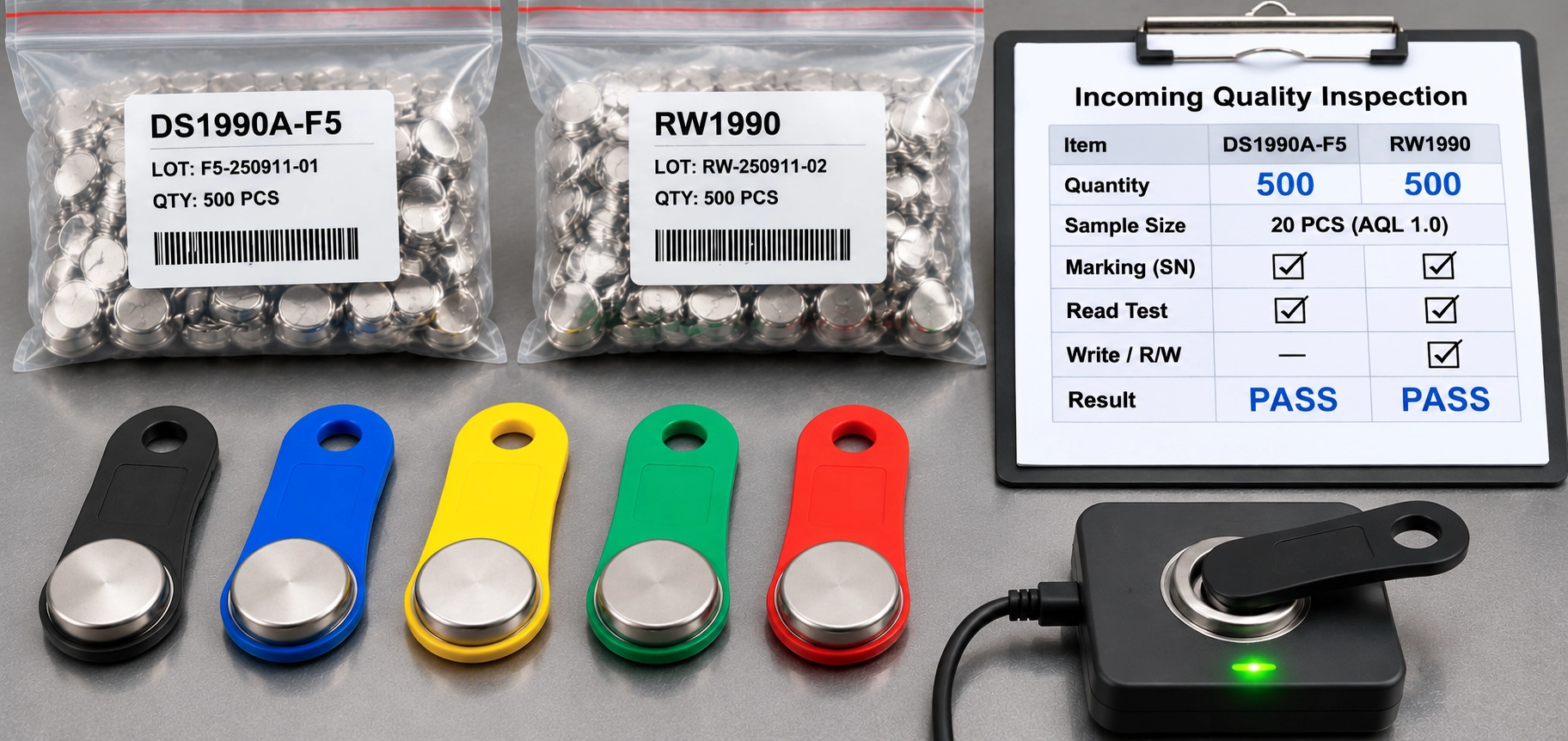
Break your PO inspection requirements into distinct, verifiable line items:
Electronic read verification: Confirm whether every finished key is read-tested before packing and what constitutes a pass.
Write and read-back checks (RW1990 orders): If you are ordering pre-programmed or blank rewritable keys, specify whether write and read-back testing is performed per order, on a defined sampling plan, or by your own authorized team upon arrival.
External marking vs. internal ID alignment: Keep factory ROM IDs, housing serial numbers, and custom laser-marked numbers clearly separated in your specification. If your operations team tracks keys by printed numbers in a spreadsheet, confirm whether the laser-marked string must match a specific byte format of the electronic ID and request a mapping file per lot.
Lot traceability and change notification: Require the supplier to label inner packs and cartons with lot numbers tied to the approved chip revision, and establish a re-verification trigger if the silicon source, blank revision, or molding process changes.
If your project requires custom housing colors, logo engraving, sequential numbering, or specific pack labeling, review artwork and sign-off procedures under Syntek OEM marking and packaging options before freezing your PO.
Scope note: If you are replacing contact keys specifically for wet-area lockers or wristband assemblies rather than vehicle terminals or building intercoms, see our dedicated guide on Touch Memory replacements for sauna locks.
What to Send Syntek When Requesting Compatibility Samples
To narrow down the right fixed-ID or rewritable sample set without unnecessary back-and-forth, prepare the following hardware and order details before submitting an inquiry. Never share live production access keys or active facility master credentials; use sanitized examples or dedicated test IDs only.
| RFQ Field | What to Include | Why It Matters |
|---|---|---|
| Target Hardware & Firmware | Terminal or intercom panel brand, exact model, and active firmware version | Guides fixed-ID vs. RW1990 sample selection |
| Contact Probe Model | Existing reader or probe model (e.g., DS9092-type) and mounting orientation | Confirms F5 housing fit and contact alignment |
| ID Policy & Writer Info | Fixed ID vs. rewritable blank; approved writer model and revision for RW1990 orders | Matches blank revision to your programming station |
| Expected ID Display Format | Byte order, hex or decimal format, leading zeros, and family/CRC byte rules | Aligns laser-marked numbers and mapping files with your backend |
| Estimated Volume & Cadence | Trial sample count, initial PO volume, and replenishment schedule | Aligns lot allocation, marking setup, and project-specific MOQ and lead times |
| Marking & Traceability Spec | Fob color, artwork, electronic-to-laser ID matching, and lot label rules | Locks visual and administrative acceptance criteria before production |
| Safe Test Reference | Sanitized ID format example or dedicated non-production test ID | Supports format verification without exposing live credentials |
Request RW1990 and Fixed-ID TM Key Samples for Compatibility Testing - Share your terminal or panel model, ID policy, and marking requirements to arrange test samples for your bench and field verification.
Browse Syntek iButton Tags and Probes - Review available F5 key housings, contact probes, and related Touch Memory formats.
Send Inquiry