


Wooden Hotel Key Card Design for Logos, Printing and QR Codes
Nov 17, 2026
Leave a message

A wooden hotel key card design should be approved on the actual card surface, with the logo, guest instructions and any QR code checked at their finished size. A digital mockup helps agree the layout; the physical sample establishes whether the selected wood and decoration produce a usable result.
This guide is for boutique hotel and design-led resort brand designers, procurement teams and hotel-supply partners preparing custom artwork after choosing wood as a material. If that decision is still open, start with the broader guide to choosing wooden RFID key cards for hotels.
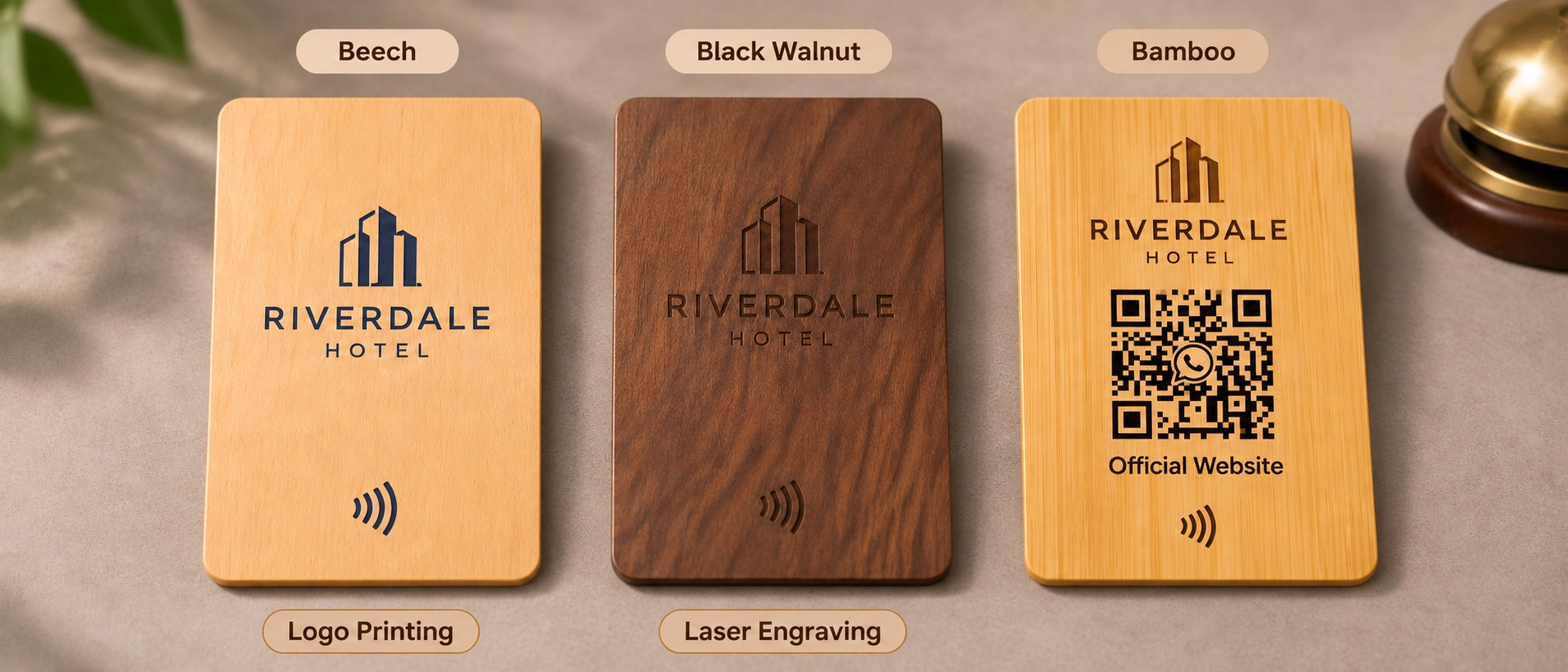
Decide What Guests Need to See on the Card
Start by assigning a purpose to each face. One practical layout is a hotel name and recognizable logo on the front, with brief operating instructions and an optional guest-information link on the back. This is a design starting point, not a required format.
Keep the wording tied to the property's actual operation. A tap instruction should match the installed reader. A QR code should state its purpose, such as opening the guest directory, so guests know what scanning it will do. An informational QR code does not automatically function as a room-access credential. If QR-based room access is proposed, ask the authorized lock provider to confirm whether the installed platform supports it and to specify the issuing and reader workflow. Keep that approval separate from the guest-information link.
Decide what belongs on the accompanying sleeve instead. A property map, long welcome message or several translations may be easier to use there than when reduced to fit the card. Review the card and sleeve together so important information is neither missing nor unnecessarily repeated.
Before adding decorative details, ask the front-desk team to read the proposed wording. They can confirm whether the instructions describe the check-in experience the hotel will actually provide.
Approve the Logo Against the Selected Wood Surface
Use the proposed wood and finish as part of the design brief. A logo shown over a stock wood photograph does not establish how it will look on the supplied cards.
Ask for physical samples that show the proposed surface and its expected variation. Review the smallest lettering, enclosed spaces in the logo and any fine lines at actual size. The useful question is whether the hotel identity stays legible across the range being offered, rather than whether one unusually attractive sample looks good.
For example, if a dark logo becomes difficult to distinguish on a proposed dark surface, compare a simplified mark, a larger layout or a printed treatment on physical proofs. Changing wood species is another option, but it should follow a comparison rather than an assumption that every darker card needs the same remedy.
Record the accepted appearance with the sample references: wood selection, finish, logo treatment and acceptable variation. Photographs can help identify the references, but retain the physical samples for later comparison.
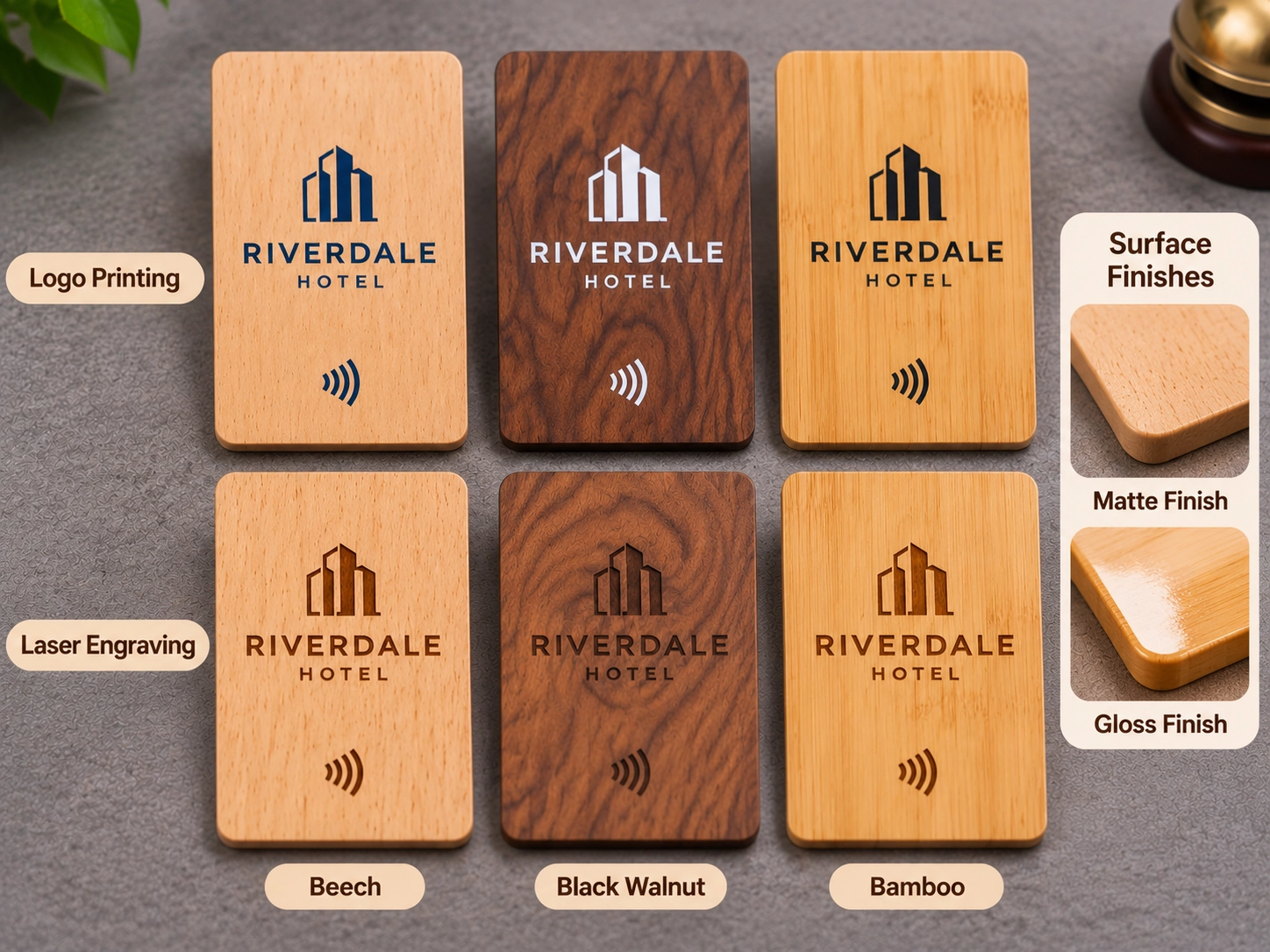
Map Each Artwork Element to a Production Instruction
Assign a production method to each part of the artwork. A black shape in a PDF could mean black ink or an engraved area; the supplier should not have to infer the intention.
Use the following handoff checklist to connect each file element to a decision on the proof. It is a suggested workflow; agree the actual file setup with the manufacturer.
| Artwork element | Instruction to include in the handoff | Check on the proof |
|---|---|---|
| Engraved logo or lettering | Identify the engraving artwork separately from printed black ink; label the intended face and position | Compare the smallest letters, fine lines and contrast on the selected finished surface |
| Printed logo, text or illustration | Identify the print area, approved color reference and any proposed backing layer | Check color appearance and legibility on the actual wood and finish |
| Elements using both processes | Distinguish the engraved and printed parts and show their intended alignment | Approve their relative positions and check that neither treatment obscures required detail |
| Cut line, safe area and bleed guides | Keep template marks identifiable as nonprinting instructions in the supplier's requested format | Check final placement and confirm that production guides are absent from the finished card |
Do not assume that every process combination is available for every card construction. Ask the manufacturer to confirm the proposed setup before treating the artwork as ready for sampling.
For a brand color, provide the approved reference and ask how the printer proposes to reproduce it on the selected wood. If a backing layer or other surface preparation is proposed, include it in the proof specification. Do not approve a color only from a laptop display or prescribe a universal color tolerance without an agreed measurement method and production capability.
For engraving, approve the appearance rather than requesting an arbitrary depth. The card manufacturer needs to confirm a process suitable for the finished card construction. A more deeply marked sample is not automatically the better design.
Prepare Artwork in the Manufacturer's Template
Obtain the template for the agreed card outline before finalizing the layout. It should distinguish the finished cut line, safe area for important content and any bleed required by the selected printing process. Confirm how the reverse face is oriented relative to the front.
Do not carry dimensions, corner details or margins over from an unrelated plastic-card template. Ask the manufacturer to confirm minimum lettering and line widths for the actual material and process. There is no single artwork setting in this guide that can replace that confirmation.
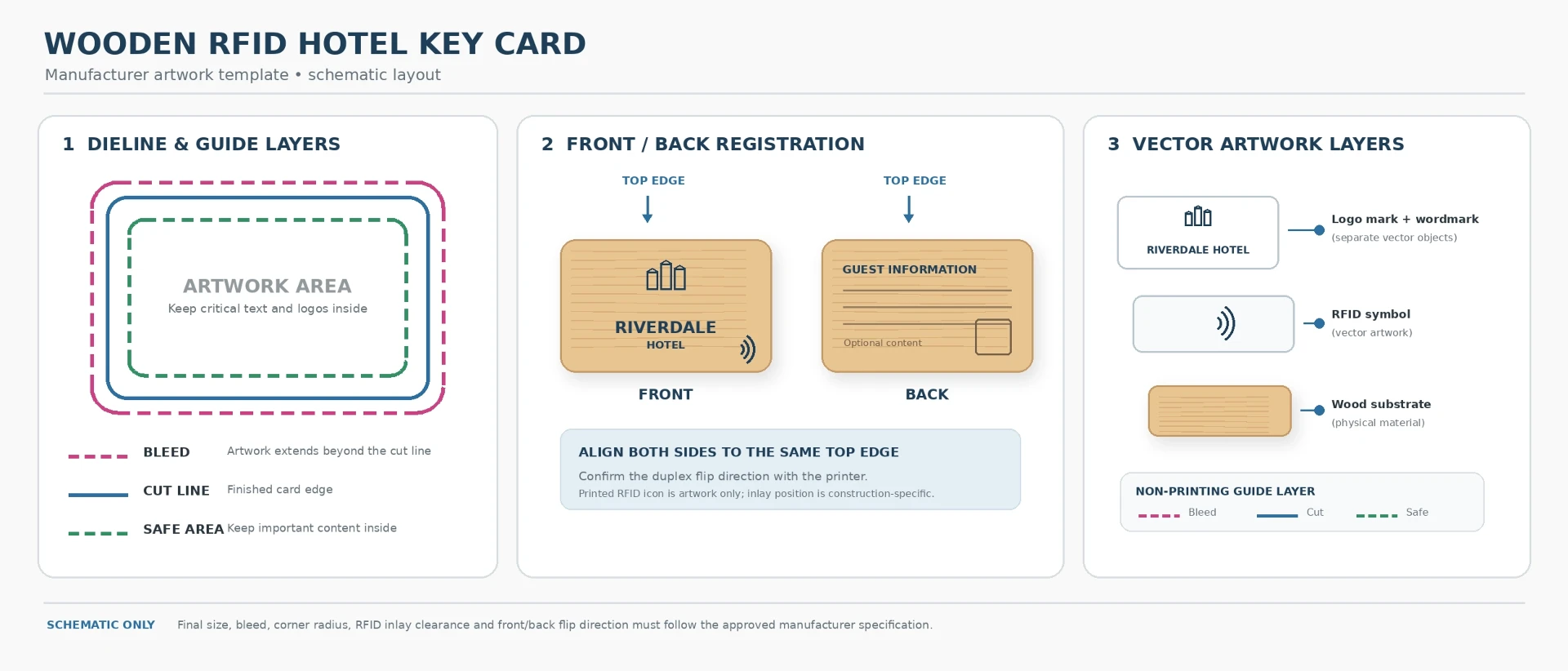
Supply an editable vector logo where available, with the front and back clearly identified. Separate engraving, printed graphics and nonprinting template marks using the supplier's requested file structure. Include the approved copy and a dated revision reference so the proof can be traced to the correct design.
For a PDF containing live text, check that the intended fonts are embedded where licensing permits. Adobe's PDF font guidance, updated September 23, 2025, explains that embedding includes the font information in the PDF and prevents substitution during viewing or printing. If the supplier requires a different production format, agree it before approval. (Adobe)
Keep an editable master even when the production file requires outlined lettering. Check the exported proof again, especially accented characters, translated instructions and small reversed text.
Make the QR Code Work on the Finished Card
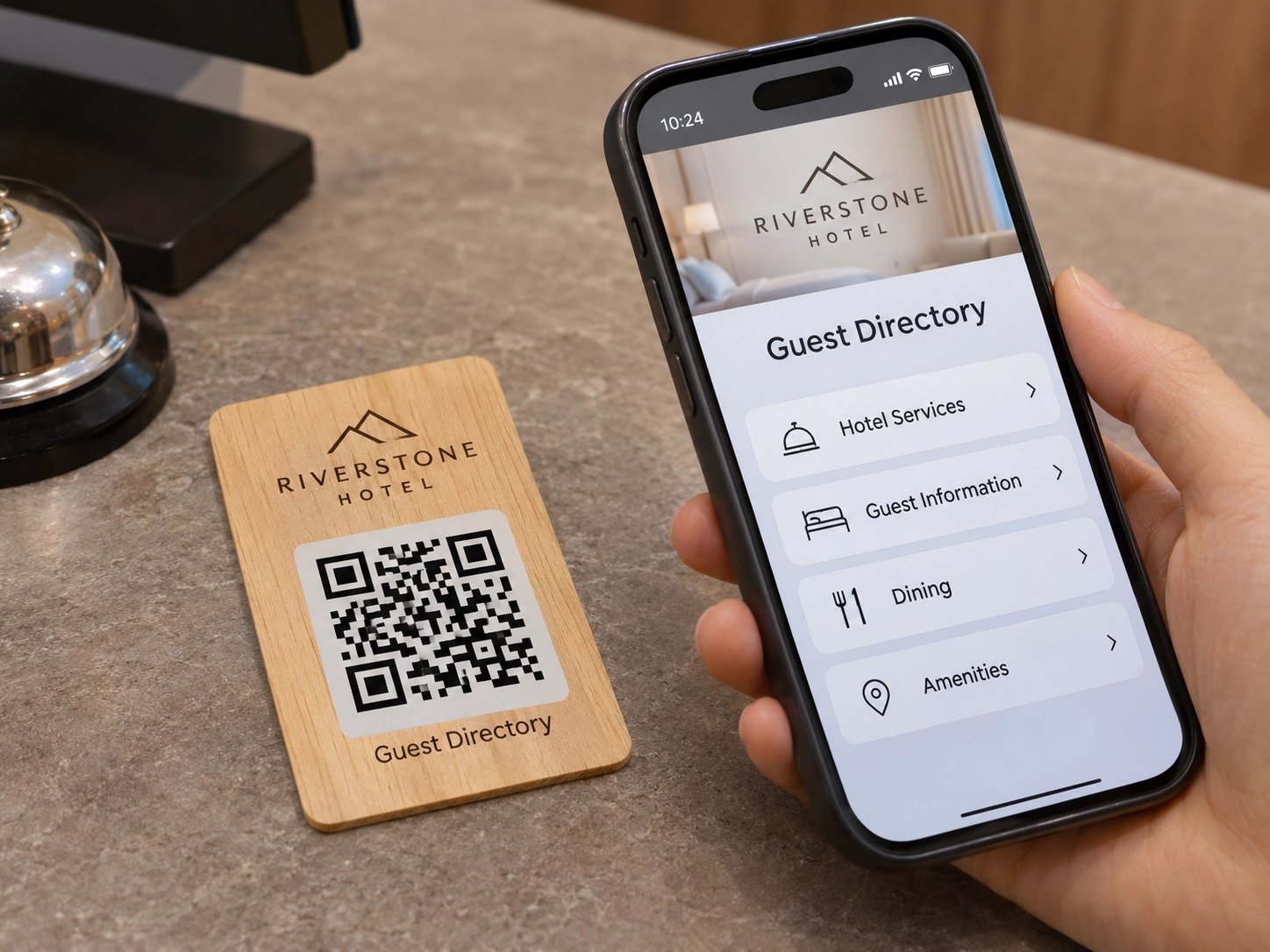
Treat an optional QR code as a functional element. Approve both the printed symbol and the destination it opens.
A standard QR Code needs a clear quiet zone at least four modules wide on every side. A module is one of the small squares forming the symbol; four modules does not mean four millimeters. Keep text and decoration out of that space. (DENSO WAVE)
If the proposed wood grain or finish makes the background uneven, ask the printer to evaluate a solid light background for the code and its quiet zone. This is a design option to test, not a claim that every wooden card needs the same printed patch. Choose the final symbol size with the supplier according to the encoded content and achievable print quality, rather than shrinking it to fill a leftover corner.
Keep the square grid intact. DENSO WAVE identifies distorted modules, graphics intruding into the margin and overlays that reduce contrast as possible causes of reading problems. Regenerate the symbol at the required output size instead of stretching a screenshot. (DENSO WAVE)
Scan the finished physical proof using the phones and camera apps selected for the hotel's acceptance check, under representative lighting. Check the card inside its sleeve if guests are expected to scan it that way. A successful scan from a screen does not test the printed surface.
Then check the destination: correct property, appropriate language, working mobile page and an identified hotel contact responsible for keeping it available. Use a hotel-controlled address where practical. For this guest-information use, the QR code is scanned with a phone camera. An NFC tap is a separate interaction; approval of the printed QR code does not establish NFC functionality or hotel-lock compatibility.
Give Each Approval a Clear Scope
Use separate approval fields for layout, physical appearance and access performance. This lets the designer approve the brand presentation without accidentally signing off the hotel credential configuration.
The following is a suggested review record, not an industry test standard or a report of testing already completed by Syntek.
| Review item | Evidence to record | Suggested reviewer |
|---|---|---|
| Text and layout | Front/back proof revision, spelling, languages and orientation | Hotel brand or design contact |
| Wood appearance | Physical sample references and accepted variation | Design contact and procurement |
| Logo and decoration | Selected process, legibility, color reference where relevant and finish | Design contact and supplier |
| QR symbol, if included | Finished sample scanned, devices and conditions used | Hotel operations contact |
| QR destination | Exact address, property, language and maintenance owner | Hotel digital or operations contact |
| Card and sleeve | Fit, visibility and consistency of instructions | Front desk and procurement |
| Access function | Separate approval against the hotel's issuing and lock system | Engineering or authorized lock provider |
| Production release | Final artwork revision and corresponding approved sample references | Procurement |
For the access and batch-control side of an existing hotel's order, use the separate RFID hotel key card reorder checklist. An attractive proof cannot substitute for that technical approval.
If anything changes after approval, record the revision and reopen the affected checks:
- If the address encoded in the QR code changes, regenerate the symbol, update the artwork and repeat the printed scan and destination checks.
- If the encoded address stays the same but its web content changes, check the destination again. Confirm that it still provides the intended property information and language.
- If the symbol size, placement or background changes, repeat the scan check on the revised physical proof.
- If the wood, construction, decoration or finish changes, ask the manufacturer and hotel technical reviewer which appearance and functional checks must be repeated.
Release production against the final artwork revision and its corresponding approved sample references.
Send Syntek a Focused Design Brief
Syntek lists beech, black walnut and bamboo in its wooden card range, together with laser engraving and full-color UV printing options. Its RFID OEM/ODM customization services also describe artwork, numbering, QR code and packaging customization. Confirm the available combination for your proposed card instead of assuming that every listed option applies to one order.
For a custom wooden hotel key card inquiry with Syntek, prepare:
- The property name, vector logo and approved guest-facing text.
- The selected wood and finish, or the specific alternatives to compare.
- Front/back artwork with printed and engraved elements clearly identified.
- Brand color references and the features that need physical approval.
- The final QR destination, if used, and any sleeve requirements.
- Quantity per design, required delivery date and the hotel's technical contact for credential confirmation.
Send this brief through Syntek's contact page. Ask Syntek to confirm the available wood and finish, process combination, artwork suitability and template requirements, proposed physical-sample approval scope, sample and bulk-order quotations, and who will coordinate credential confirmation with the hotel's technical contact. That gives the designer, buyer and supplier a shared reference for the next decision.
Send Inquiry