


Custom VIP Cards: Printing Options, Card Design And Bulk Ordering Guide
Nov 24, 2026
Leave a message

Custom VIP cards give a business a physical way to recognize preferred customers and distinguish membership levels. For a retail shop, restaurant, salon or fitness club, a full-color PVC card with a readable tier name and an optional membership number may be all that is required. A metal body, decorative foil and electronic chip are not essential features of a VIP card.
The best place to start is with the card that staff will actually handle. What needs to be visible on its front? Will the customer present it for a visual check or use it with an existing scanner? How many designs will be ordered, and will the smallest tier need regular replenishment? Those answers determine the construction, print process and personalization requirements more reliably than the word VIP.
This guide focuses on practical plastic VIP cards for ordinary businesses. It covers how to prepare a family of printed designs, choose an appropriate finish, compare quotations and approve representative samples before placing a bulk order.
What Are Custom VIP Cards?
A VIP card is a membership or preferred-customer card printed for a particular business or program. Its distinguishing feature is the benefit it represents, rather than a particular material or identification technology. A standard member card and a VIP card can use exactly the same PVC body, while their artwork communicates different membership levels.
Some programs use a card as a recognizable token for a fixed offer. Others attach a unique card identifier to a customer record so that staff can look up current eligibility. Decide which of these jobs the card has to perform before adding personalized details. A printed logo, tier label and customer service instruction are sufficient for some visual programs; account-based discounts may require a number or a compatible machine-readable identifier.
Membership points, subscription validity and available discounts are determined by the business's rules or account records. A printed card does not update them. Keeping the physical design focused on stable information also makes replacement orders easier when the business changes its offers.
Custom VIP Cards for Different Businesses
A neighborhood shop and a multi-location fitness business might both request VIP membership cards, but they need different artwork and identification fields. Start with the moment of presentation, not a catalog of decorative options.
| Application | Practical card configuration | Design or ordering concern |
|---|---|---|
| Retail and convenience stores | Full-color card, visible tier and optional membership number | Keep the tier readable under checkout lighting; reserve space for a code only if required by the checkout system. |
| Restaurants and cafes | Simple branded PVC card with a short presentation instruction | Avoid printing temporary menus or changing offers on a long-term card. |
| Salons and beauty businesses | Tier-specific card with a name or reference number if needed | Leave a clear personalization area; package different service-plan designs separately. |
| Fitness clubs | Membership card with visual identification or a verified electronic credential | Confirm the finished card fits the existing check-in equipment and that a tap or scan retrieves the right record. |
| Multi-location shops | Shared brand layout and a consistent number format | Decide whether branch names must be printed or can remain in the membership record. |
For a cafe that offers a standing discount to all VIP members, the staff may only need to recognize one design. Printing a branch number, customer photograph and expiry date would create extra variants without necessarily improving the checkout process. A salon with several prepaid packages may instead need distinct tier names, plus a number that points to the customer's current package record. Even there, the card does not need to list every individual service.
Consider how long the design will remain useful. A card printed for a short seasonal promotion may become obsolete long before its surface wears out. A stable brand design with changing offers communicated separately can reduce unnecessary reprinting. Where an expiry date is essential to a visual-only program, decide whether to print one date for a whole issue or personalize each card.
Choosing the Right PVC Card Construction
For routine wallet-carried membership cards, a rounded rectangular PVC card is a sensible starting point. The familiar ID-1 format is approximately 85.6 by 54 mm, and a thickness around 0.76 mm is common in ordinary plastic card printing. The ISO/IEC 7810:2019 physical-characteristics standard provides context for identification card formats; a nominal size alone does not establish that a finished product meets the standard or fits every device.
Ask for the finished construction, not just the base material. Printed PVC can be made with a protective surface layer, while an electronic card also contains an inlay. Its finished thickness may therefore differ from the ordinary card your staff already use. For example, Syntek's printable NFC PVC card is listed at 85.5 by 54 by 0.84 mm. That is a model-specific catalog dimension, not a universal requirement for VIP cards.
When replacing an existing card, retain an actual sample and measure or obtain the finished dimensions. A printer, swipe device or close-fitting card holder may impose its own limits on thickness and flatness. A visual-only membership card gives the buyer more freedom, but there is little reason to choose a special size unless the design or handling method calls for it.
Special shapes also affect artwork preparation, cutting and repeat ordering. A different outline may require a separate production setup. For a family of three membership tiers, keeping the same rectangular body and changing the print design is usually the simpler option to evaluate. Ask for a quotation before assuming that changing the shape, thickness or material is economical.
Ordinary chip-free printed cards are an industry option. Where they are required, specify that construction explicitly when asking for a quote; the availability of RFID PVC cards does not establish that every chip-free variant is available from the same supplier.
Printing and Finishing Options for VIP Cards
Two cards can have identical artwork files but quite different printed appearances. The production method determines how color is applied, while the surface finish changes how the card looks and feels under light. Choose these together rather than treating the finish as the last decorative decision.
Full-color offset, screen printing and digital printing
Offset printing transfers an image from a printing plate through a blanket to the substrate. CMYK process colors can reproduce photographs, gradients and multicolored artwork. For repeatable artwork on a substantial batch, offset printing is worth requesting as a quote option. Each artwork version may require its own preparation, although suppliers may be able to arrange several designs together in one production run.
Screen printing deposits ink through a prepared screen. It is useful for solid spot-color areas, simple logos and designs where a particular brand color matters. A specified spot color is a target, not a guarantee that the final card will look identical to the color swatch: the substrate, ink and finish affect appearance. If the membership tiers use a common logo, ask whether the same spot-color reference can be retained across all variants.
Digital printing generally avoids a conventional printing plate and is an option to compare when quantities per artwork are small or the design changes frequently. It does not automatically mean that every card can carry a different data record. Variable-data personalization must be included in the order and verified separately.
Syntek's product information lists full-color offset, spot-color screen printing and inkjet numbering for its printable NFC PVC card; the wider OEM/ODM customization information also displays digital and laser marking processes. Confirm the combination available on the selected card construction. A process shown for another RFID product is not automatically an option for every PVC card.
| Print requirement | Process to discuss | Sample or quote question |
|---|---|---|
| Color photographs or gradients across a repeated design | CMYK offset or compatible digital printing | Can the approved color and small details be reproduced on the final surface? |
| Simple solid logo or a defined spot color | Screen printing or agreed spot-color process | What color reference and physical proof will govern approval? |
| Several artwork designs in unequal quantities | Compare offset and digital quotations | Are setup, minimum quantities and sorting charged by design? |
| Individual card numbers | Compatible inkjet or other variable-marking process | Is the marking applied before or after finishing, and how will readability be checked? |
Glossy, matte or frosted?
A glossy finish gives printed artwork a shiny appearance and can suit a photograph or colorful shop logo. Under direct counter lighting, however, reflected light can obscure fine text. A matte finish reduces the shiny appearance and may make a simple tier label easier to see at some angles. A frosted finish introduces a different surface texture; the buyer should inspect how it affects fine lettering or any machine-readable mark.
None of these names establishes scratch resistance or a fixed service life. The coating or laminate, card construction and handling conditions all matter. A useful comparison is to request the same representative design on two candidate finishes and view them side by side at the place where the card will be presented. Examine the dark areas, small text, edge appearance and identification number.
For cards that will be personalized after delivery, verify that the surface accepts the intended marking process. A finish that looks good on a completed sample is not necessarily suitable for an additional print pass. Card-printer manufacturer Evolis explains direct-to-card and retransfer printing, including the possibility of adding variable elements to suitable preprinted stock. Check the actual printer and consumable specifications rather than treating these processes as interchangeable.
A simple signature panel may be useful where a signature is part of the business's verification procedure. Test the intended pen on the actual panel. If the card only needs a printed number, adding a signature panel or other decorative options may be unnecessary.

How to Design VIP Cards for Multiple Membership Tiers
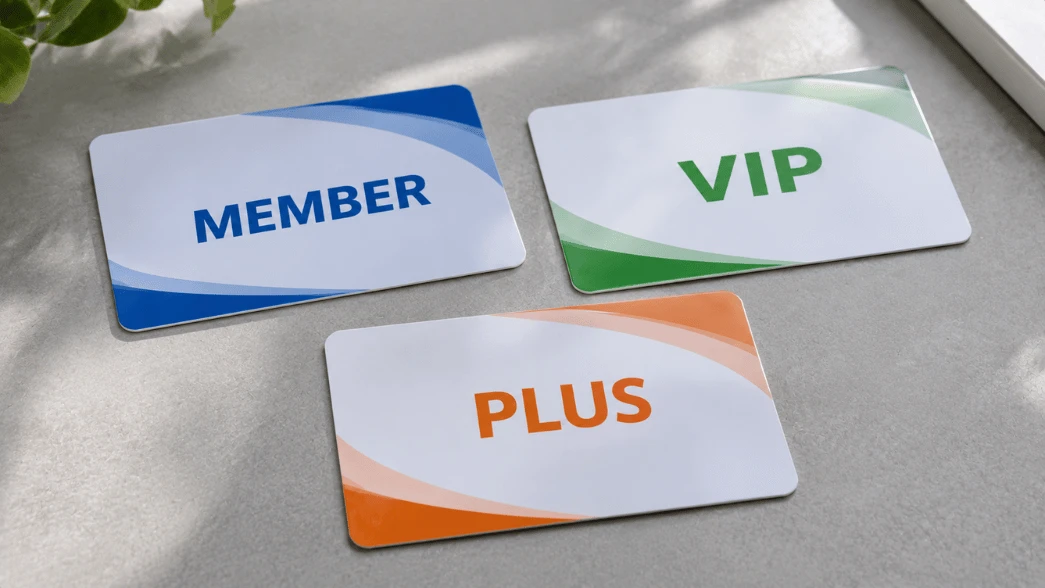
A card family should look like one brand, not three unrelated businesses. Keep the card outline, logo position and orientation consistent. Change a prominent tier word and a clearly distinguishable color area. For instance, a shop could choose blue MEMBER, green VIP and orange PLUS designs. The actual names and colors should follow its brand and membership rules.
Use both text and color to distinguish the tiers. A subtle shade change alone can be difficult to recognize under poor lighting or for customers and staff with color-vision differences. Place the tier label in a position that remains visible when a person holds the card at its edge. Compare all three physical samples together; a design may look distinct on a monitor but too similar to another card at the counter.
Give the front and back different jobs
The front should answer whose card it is and which tier it represents. The back can provide a stable website, a short instruction for presenting the card and an identification area when needed. If a retailer changes its discount each month, leave the changing percentages out of the permanent artwork unless the card is intentionally time-limited. The reverse should remain readable without forcing staff to search through dense text.
When different tiers use a common back, create a controlled master back file and name the front artwork for each variant. Confirm whether the common back can actually share production setup. If a tier needs different instructions, keep that back as a separate approved design rather than assuming the front color alone distinguishes the product.
Decide whether to print personal names before or after the bulk run. Fully personalized cards suit a known member list; numbered, unnamed cards can be stocked in advance. A preprinted card with a reserved name field may support later personalization if the selected stock and printer are suitable. The blank versus preprinted card comparison addresses that production-route decision in more detail.
Preparing Artwork for Production
Before sending artwork, request the supplier's template for the exact finished card. A design drawn at the nominal card size can still have a cutting problem if the background ends at the cut line. Extend the background into the required bleed area and keep text, logos and numbers inside the stated safe area. The trim line marks the intended finished edge; bleed is sacrificial artwork outside it.
Do not use a narrow decorative border to hide a cutting tolerance. A small shift can make the border visibly uneven on opposing edges, even when the card dimensions are acceptable. Either allow a generous border with agreed alignment criteria or use a background that extends to the edge without a thin frame.
For process-color printing, supply artwork in the color space and file format requested for the selected process. CMYK conversion can change the appearance of saturated screen colors. If the brand color is critical, supply the approved reference and agree how the physical sample will be compared. A digital PDF proof is valuable for checking content and position, but the monitor is not the final printed surface.
| Artwork issue | Likely visible result | Before production |
|---|---|---|
| Background stops at trim | Unprinted sliver at an edge | Extend artwork to the supplier's bleed boundary. |
| Tier word near a rounded corner | Clipped lettering or uncomfortable spacing | Move the word inside the safe area. |
| Low-resolution logo enlarged from a website | Soft edges or pixelation | Supply the original vector or suitable high-resolution file. |
| Missing font or linked image | Replaced typeface or missing graphic | Embed assets or outline text as requested; inspect the exported proof. |
| Front and back files use different orientation | Reverse appears upside down in normal use | Mark the intended turning direction in the approval proof. |
| Long member number crowds other text | Overlapping or truncated personalization | Proof the longest expected value, including leading zeros. |
Many print suppliers request vector artwork or high-resolution raster images and specify their own bleed dimensions. Use their current instructions rather than borrowing another printer's numerical tolerances. For example, a 300 dpi raster image is a common starting point for print artwork at final size, but enlarging a low-resolution file does not restore lost detail. Confirm the actual template, resolution and color requirements before approval.
For three variants, review the front and back files as a complete set. Check that the correct tier label appears on each front and that every file points to the intended back. Keep editable artwork and an approved output file under a revision name, such as VIP-R02. When ordering again, refer to that revision instead of a screenshot or an email attachment called final-new.

Do Custom VIP Cards Need Barcodes or RFID?
Choose the identification feature according to the equipment and business task. A visual card may need no unique electronic identifier. A numbered card allows staff to enter a reference manually. A printed barcode or QR code may be useful if the existing application accepts its data format. A contactless card may be appropriate for a business that already uses a compatible reader and membership system.
For a printed code, leave the required clear area and verify its readability on the final surface. For a chip, specify technology, frequency, protocol, chip, data format and encoding, and confirm the installed reader and associated software can complete the intended membership transaction. Test the exact sample in the real workflow; a tap that produces an identifier is not proof that the correct discount or admission has been applied.
There is no reason to add RFID to a visual-only program simply because it is called VIP. See the separate guides to choosing PVC cards with or without RFID and barcode membership card printing and scan tests for those technical decisions.
What Determines the Cost of Custom VIP Cards?
The total quantity is only one input to a custom quote. A thousand identical cards can represent a different production job from a thousand cards divided among three designs, even if the PVC construction is the same. Compare the quantity per artwork, printing process, finish, variable-data work, sample fees and packaging. A quote that includes individual numbering and sorting should not be compared directly with a quote for unnumbered cards in one mixed carton. Ask the supplier to identify whether a charge applies per order, per design or per card; those three charging bases behave differently when the smallest membership tier is reordered.
A three-tier example
Suppose a retailer expects to issue 700 Member, 200 VIP and 50 Plus cards and wants additional replacement stock. The following is an illustrative order plan, not a customer order, minimum order requirement or price quotation.
| Artwork | Initial issue | Reserve | Order quantity | Physical card serials |
|---|---|---|---|---|
| Member | 700 | 30 | 730 | 000001–000730 |
| VIP | 200 | 15 | 215 | 000731–000945 |
| Plus | 50 | 5 | 55 | 000946–001000 |
| Total | 950 | 50 | 1,000 | 1,000 distinct serials |
The 55-card Plus design deserves particular attention because the supplier may apply a minimum run or setup charge to that variant. Request the actual split, then compare it with a larger Plus order only if that stock is likely to be used. A lower unit cost on unused cards is not automatically a saving. If the smallest tier can use an approved common base design with later personalization, ask for a second quote that includes the additional printing work and equipment required.
For a fair cost comparison, add each design's extended price, any separately charged setup, personalization, proofing, sorting and packing, plus applicable delivery and import costs. Divide by the number of usable cards the order is intended to supply. Check whether items are already included in the unit price to avoid counting them twice. When quotes use different trade or delivery terms, bring them to the same delivered-cost basis.
Keep the specification unchanged while comparing alternatives. One useful request is to price the same three designs with a common matte finish, then with gloss. Another is to compare the same print and finish with and without individually marked serials, where the business permits either. That isolates the commercial impact of a choice without relying on a generic claim that one process is always cheaper.
Sample Approval and Bulk Order Inspection
Approve a digital layout for each tier first, then a physical sample using the intended construction, print process and finish. A sample of the Member card alone cannot establish the readability of the Plus card's lettering or the appearance of the VIP card's dark background. If personalized information will be added, include representative short and long values on the proof and sample.
| Inspection item | Practical acceptance check | If it fails |
|---|---|---|
| Design and orientation | Compare each side against its approved variant and revision. | Hold the affected design; correct the artwork or production pairing. |
| Color and finish | Compare physical samples under agreed lighting; inspect reflection and surface appearance. | Confirm the print and finish reference; request a corrected sample. |
| Edges and flatness | Look for exposed layers, rough edges, visible bowing and unwanted white borders; check fit if required. | Identify affected lots and review cutting or construction with the supplier. |
| Personalized marks | Compare sample values with the authorized list; inspect legibility and positioning. | Resolve the source data or marking issue before releasing the batch. |
| Optional scan or tap | Use the installed equipment and a test account; verify the intended result. | Separate identification or compatibility failures from artwork defects. |
| Quantity and packing | Reconcile by design and agreed number range, not merely carton total. | Segregate shortages, mixed variants or suspect packs for resolution. |
Set inspection quantities, permissible cosmetic variation and defect-handling rules before ordering. For instance, classify a wrong tier or duplicated required serial separately from a minor cosmetic mark; the first two change the identity of the card, while the acceptability of the latter depends on the agreed appearance criteria. Draw inspection samples from each design and separate production lot rather than only the largest carton. When a systematic error is found, hold the relevant lot and agree the scope of sorting, reprinting or reinspection before releasing it. The table is a proposed buyer's acceptance method, not a report of performed tests. If a program requires every physical card number to be unique, agree a complete reconciliation method for the identifier list; visual checks on a few cards cannot prove that the remaining identifiers are correct.
A card that looks right may still be the wrong variant. If the front says VIP but the back belongs to Member, the proof set and pack labels should help isolate the affected design. Keep a reference card from each approved variant and protect it from wear so the next order can be compared with an actual production reference.
How to Order Custom VIP Cards
Send a product specification rather than only an image of a card you like. A useful inquiry describes the finished product, the order split and what the staff must be able to do with it.
- Purpose and membership tier names; finished material, dimensions and thickness requirements.
- Front and back artwork per tier, revision, color reference, intended finish and preferred printing method if known.
- Quantity per design, reserve stock, whether numbers or names are required, and an approved example of the data format.
- Whether a chip-free, barcode-only or contactless construction is required; device and software details if a machine-readable feature is needed.
- Physical sample requirements, agreed inspection criteria, packaging by variant, requested delivery terms and repeat-order needs.
For a concise inquiry, the three-tier example could be written as: common rounded rectangular PVC body and matte finish, full-color fronts M-R01/V-R01/P-R01, common back B-R01, quantities 730/215/55, sequential numbers as listed above, separate labeled packs, and one production-representative sample of every design for approval. The actual finished thickness, identification feature, print process and commercial terms still need agreement.
When replenishing the illustrative VIP batch, the next serial must not overlap numbers already reserved for Member or Plus. If 180 of the 215 VIP cards have been issued and three unissued cards have been rejected, 32 remain available. Retain the approved design revision and the rejected-number record. A reorder should name the new non-overlapping serial allocation, not simply repeat the original artwork and numbering file.
For practical printed contactless membership cards, review Syntek's custom RFID card options and request a configuration-specific quote. If the intended card is chip-free, state that in the inquiry so its availability can be confirmed. With a controlled artwork set, agreed finish and representative physical samples, the supplier and buyer can work from the same specification on the first order and subsequent batches.
Send Inquiry